
Share Link Publishing
FastGPT share link publishing
Introduction
A share link creates a temporary public URL that lets anyone on the internet use your app. Usage is billed to the team that owns the app, so share the link only with its intended audience.
FastGPT generates a localId for each visitor to retrieve chat history from the cloud. This identity is tied to the same device and browser. Switching devices or clearing browser storage loses access to that history. Visitors can retrieve up to 20 conversations from the past 30 days.
Usage Flow
1. Create a Link
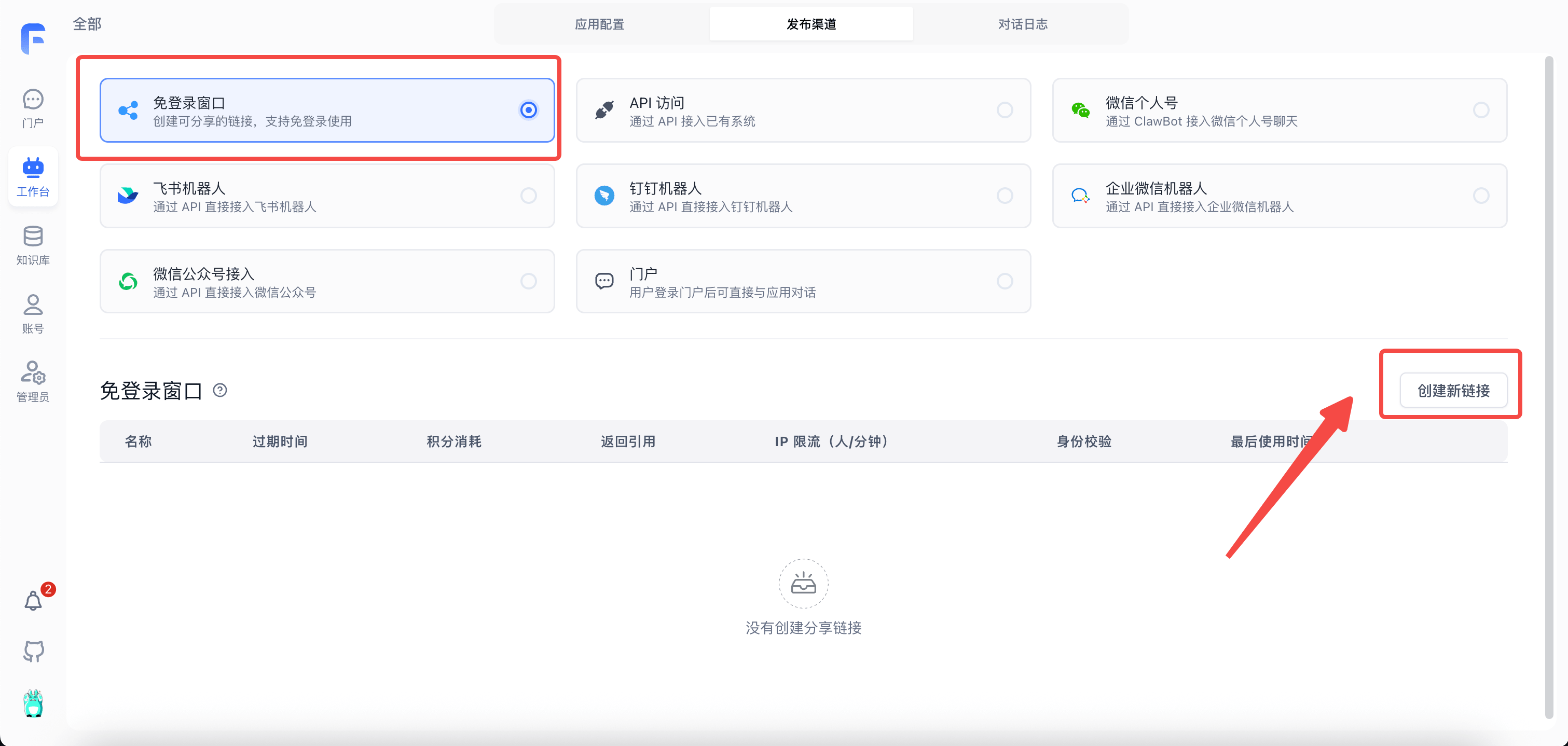
Go to App Details -> Publish Channels -> Share Link, then create a new link.
Enter a name to create the link. The name is only used for display in the record list.
2. Copy the Link
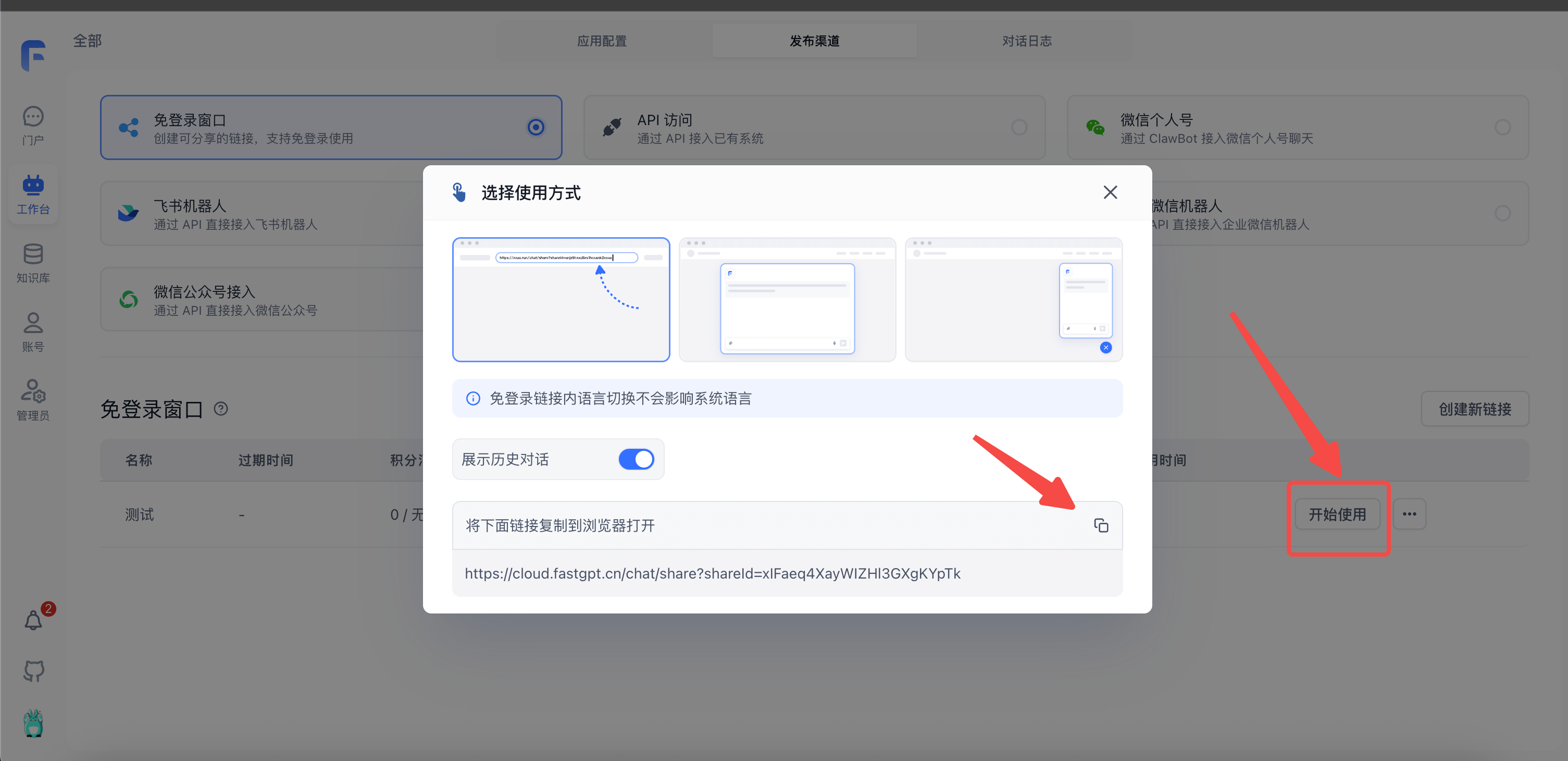
Click Start Using to open the share link, then copy and share it as needed.
Parameter Configuration
Some parameters are only available in the commercial edition.
- Name: The display name of the link record.
- Expiration time: The link becomes unavailable after this time.
- QPM: The maximum number of requests per minute for each user.
- Point limit: The maximum billable usage generated by this link.
- Identity verification: Used to integrate with third-party systems for identity authentication and chat callbacks.
- Real-time running status: Whether to show currently running nodes.
- View quoted chunks: See the system introduction.
- View full quoted content: See the system introduction.
- Download/open original source: See the system introduction.
Share Link Authentication
Introduction
Share link authentication is designed to quickly and securely integrate FastGPT's chat interface into your existing system with just 2 endpoints. This feature is only available in the commercial edition.
Usage Guide
In the share link configuration, you can optionally fill in the Identity Verification field. This is the root URL for a POST request. Once configured, share link initialization, chat start, and chat completion will all send requests to specific endpoints under this URL. Below, we use host to represent the identity verification root URL. For the initialization and pre-chat checks, return success and the required data.uid. You can include message or msg to explain a failed check. Use this response format:
Unified Response Format
{
  "success": true,
  "message": "Error message",
  "msg": "Same as message, error message",
  "data": {
    "uid": "Unique user identifier" // Required
  }
}
FastGPT checks whether success is true to decide if the user can proceed. message and msg are equivalent -- you can return either one. When success is not true, this error message will be displayed to the user.
uid is the unique user identifier and must be returned. The ID format must be a string that does not contain |, /, or \\ characters, with a length of 255 bytes or less. Otherwise, an Invalid UID error will be returned. The uid is used to pull and save chat history -- see the practical example below.
Flow Diagram
When a visitor opens the link, FastGPT sends authToken to the initialization check. A successful check loads the app; a failed check blocks access. Each submitted message then passes through the pre-chat check. After an allowed conversation finishes, FastGPT sends its results to the optional reporting endpoint.

Configuration Guide
1. Configure the Identity Verification URL

Once configured, every time the share link is used, verification and reporting requests will be sent to the corresponding endpoints.
You only need to configure the root URL here -- no need to specify the full request path.
2. Add an Extra Query Parameter to the Share Link
Add an extra parameter authToken to the share link URL. For example:
Original link: https://share.fastgpt.io/chat/share?shareId=648aaf5ae121349a16d62192
Full link: https://share.fastgpt.io/chat/share?shareId=648aaf5ae121349a16d62192&authToken=userid12345
This authToken is typically a unique user credential (such as a token) generated by your system. FastGPT will include token=[authToken] in the body of the verification request.
3. Implement the Chat Initialization Verification Endpoint
curl --location --request POST '{{host}}/shareAuth/init' \
--header 'Content-Type: application/json' \
--data-raw '{
    "token": "[authToken]"
}'
{
"success": true,
"data": {
"uid": "Unique user identifier"
}
}The system retrieves chat history for the returned uid under this share link.
{
  "success": false,
  "message": "Authentication failed"
}
4. Implement the Pre-Chat Verification Endpoint
curl --location --request POST '{{host}}/shareAuth/start' \
--header 'Content-Type: application/json' \
--data-raw '{
    "token": "[authToken]",
    "question": "User question",
}'
{
"success": true,
"data": {
"uid": "Unique user identifier"
}
}{
"success": false,
"message": "Authentication failed"
}{
"success": false,
"message": "Content policy violation"
}5. Implement the Chat Result Reporting Endpoint (Optional)
This endpoint has no required response format.
The reporting request includes the detailed responseData from the chat endpoint response, along with token, which carries the visitor's authToken.
Within each responseData entry, totalPoints records the AI points consumed and tokens records token consumption.
The sample retains the recorded usage values and the exact legacy Embedding-2 model label. The Chinese model suffix means "legacy version, not recommended."
curl --location --request POST '{{host}}/shareAuth/finish' \
--header 'Content-Type: application/json' \
--data-raw '{
    "token": "[authToken]",
    "responseData": [
        {
            "moduleName": "core.module.template.Dataset search",
            "moduleType": "datasetSearchNode",
            "totalPoints": 1.5278,
            "query": "Who is the director\nWho is the director of Suzume?\nWho directed this film?\nWho directed Suzume?",
            "model": "Embedding-2(旧版,不推荐使用)",
            "tokens": 1524,
            "similarity": 0.83,
            "limit": 400,
            "searchMode": "embedding",
            "searchUsingReRank": false,
            "extensionModel": "FastAI-4k",
            "extensionResult": "Who is the director of Suzume?\nWho directed this film?\nWho directed Suzume?",
            "runningTime": 2.15
        },
        {
            "moduleName": "AI Chat",
            "moduleType": "chatNode",
            "totalPoints": 0.593,
            "model": "FastAI-4k",
            "tokens": 593,
            "query": "Who is the director",
            "maxToken": 2000,
            "quoteList": [
                {
                    "id": "65bb346a53698398479a8854",
                    "q": "Who is the director?",
                    "a": "The director of Suzume is Makoto Shinkai.",
                    "chunkIndex": 0,
                    "datasetId": "65af9b947916ae0e47c834d2",
                    "collectionId": "65bb345c53698398479a868f",
                    "sourceName": "dataset - 2024-01-23T151114.198.csv",
                    "sourceId": "65bb345b53698398479a868d",
                    "score": [
                        {
                            "type": "embedding",
                            "value": 0.9377183318138123,
                            "index": 0
                        },
                        {
                            "type": "rrf",
                            "value": 0.06557377049180328,
                            "index": 0
                        }
                    ]
                }
            ],
            "historyPreview": [
                {
                    "obj": "Human",
                    "value": "Use the content inside the <Data></Data> tags as a reference for this conversation:\n\n<Data>\nWho is the director?\nThe director of Suzume is Makoto Shinkai.\n------\nWho is the screenwriter of Suzume?22\nMakoto Shinkai is the screenwriter of this film.\n------\nWho is the female lead in Suzume?\nThe female lead is Suzume.\n------\nWhich well-known person is part of the production team for Suzume?2\nGenki Kawamura is a member of the production team for this film.\n------\nWho are you?\nI am an assistant for the film Suzume\n------\nWho is the male lead in Suzume?\nThe male lead in Suzume is Souta Munakata, voiced by Hokuto Matsumura.\n------\nWhat is the name of the novel written by Makoto Shinkai, the creator of Suzume?\nThe novel is titled Suzume.\n------\nWho is the female lead in Suzume?\nThe female lead in Suzume is Suzume Iwato, voiced by Nanoka Hara.\n------\nWhere is the story of Suzume set?\nJapan\n------\nWho voices Tamaki Iwato in Suzume?\nEri Fukatsu voices Tamaki Iwato in Suzume.\n</Data>\n\nResponse requirements:\n- Ask for clarification when you are unsure of the answer.\n- Avoid mentioning that your knowledge comes from <Data></Data>.\n- Keep answers consistent with the content in <Data></Data>.\n- Use Markdown to format your answer.\n- Respond in the same language as the question.\n\nQuestion:\"\"\"Who is the director\"\"\""
                },
                {
                    "obj": "AI",
                    "value": "The director of Suzume is Makoto Shinkai."
                }
            ],
            "contextTotalLen": 2,
            "runningTime": 1.32
        }
    ]


}'
Full responseData Field Reference:
type ResponseType = {
  moduleType: FlowNodeTypeEnum; // Node type
  moduleName: string; // Node name
  moduleLogo?: string; // Logo
  runningTime?: number; // Running time
  query?: string; // User question / search query
  textOutput?: string; // Text output

  tokens?: number; // Total context tokens
  model?: string; // Model used
  contextTotalLen?: number; // Total context length
  totalPoints?: number; // Total AI points consumed

  temperature?: number; // Temperature
  maxToken?: number; // Model max tokens
  quoteList?: SearchDataResponseItemType[]; // Citation list
  historyPreview?: ChatItemMiniType[]; // Context preview (history may be truncated)

  similarity?: number; // Minimum similarity threshold
  limit?: number; // Max citation tokens
  searchMode?: `${DatasetSearchModeEnum}`; // Search mode
  searchUsingReRank?: boolean; // Whether rerank is used
  extensionModel?: string; // Query expansion model
  extensionResult?: string; // Query expansion result
  extensionTokens?: number; // Query expansion total token length

  cqList?: ClassifyQuestionAgentItemType[]; // Question classification list
  cqResult?: string; // Question classification result

  extractDescription?: string; // Content extraction description
  extractResult?: Record<string, any>; // Content extraction result

  params?: Record<string, any>; // HTTP node params
  body?: Record<string, any>; // HTTP node body
  headers?: Record<string, any>; // HTTP node headers
  httpResult?: Record<string, any>; // HTTP node result

  pluginOutput?: Record<string, any>; // Plugin output
  pluginDetail?: ChatHistoryItemResType[]; // Plugin details

  isElseResult?: boolean; // Conditional result
};
Practical Example
We'll use Laf as the server to demonstrate how these 3 endpoints work.
1. Create 3 Laf Endpoints
Create the /shareAuth/init, /shareAuth/start, and /shareAuth/finish functions in Laf and use the corresponding examples below.

2. Configure the Verification URL
Copy any of the 3 endpoint URLs, e.g. https://d8dns0.laf.dev/shareAuth/finish, remove the /shareAuth/finish part, and enter the root URL https://d8dns0.laf.dev in the Identity Verification field.

3. Modify the Share Link Parameters
Original share link: https://share.fastgpt.io/chat/share?shareId=64be36376a438af0311e599c
Modified: https://share.fastgpt.io/chat/share?shareId=64be36376a438af0311e599c&authToken=fastgpt
4. Test the Result
- Opening the original link or a link where
authTokendoes not equalfastgptwill show an authentication error. - Sending a message containing
你will show a content policy violation error.
Use Cases
This authentication method is typically used to embed the share link directly into your app. Before opening the share link in your app, you should append the authToken parameter.
Beyond integrating with your existing user system, you can also implement a balance feature -- deduct user balance via the result reporting endpoint and check user balance via the pre-chat verification endpoint.
Last updated