FastGPTFastGPT
Admin Console

SSO & External Member Sync

FastGPT External Member System Integration and Configuration

If you don't need SSO or member sync, or only need quick login via GitHub, Google, Microsoft, or WeChat Official Account, you can skip this section. This guide is for users who need to integrate their own member systems or mainstream office IMs.

Overview

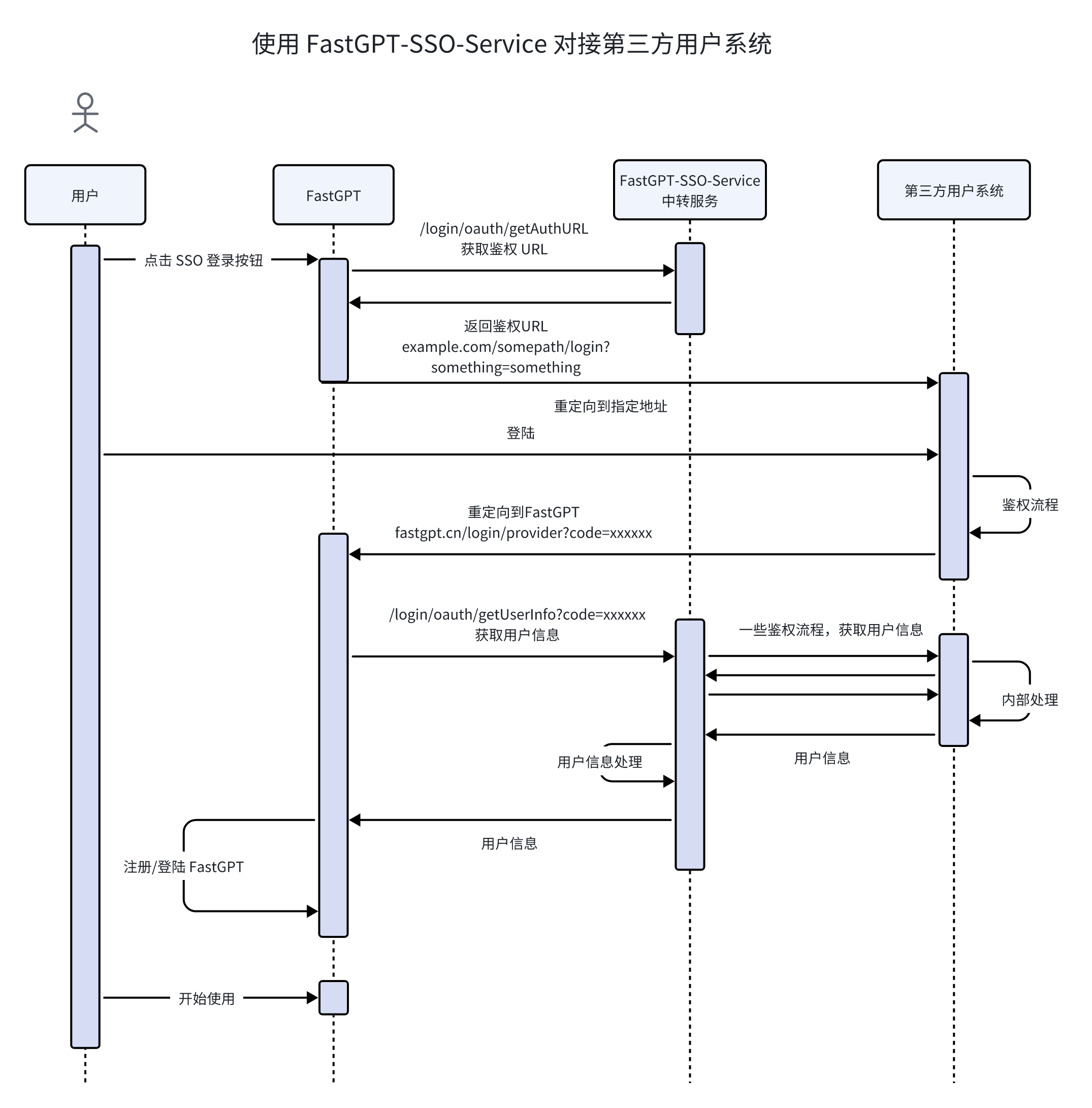
To simplify integration with external member systems, FastGPT provides a set of standard interfaces for connecting to external systems, along with a FastGPT-SSO-Service image that serves as an adapter.

Through these standard interfaces, you can:

  1. SSO login. After a callback from an external system, create a user in FastGPT.
  2. Member and organizational structure sync (referred to as "member sync" below).

How It Works

FastGPT-pro includes a standard set of SSO and member sync interfaces. The system performs SSO and member sync operations based on these interfaces.

FastGPT-SSO-Service aggregates SSO and member sync interfaces from different sources and converts them into the format recognized by fastgpt-pro.

System Configuration Tutorial

1. Deploy the SSO-Service Image

Deploy using docker-compose:

fastgpt-sso:
  image: registry.cn-hangzhou.aliyuncs.com/fastgpt/fastgpt-sso-service:latest
  container_name: fastgpt-sso
  restart: always
  networks:
    - fastgpt
  environment:
    - SSO_PROVIDER=example
    - AUTH_TOKEN=xxxxx # Auth token, used by fastgpt-pro
    # Provider-specific environment variables below

Depending on the provider, you'll need different environment variables. Below are the built-in protocols/IMs:

Protocol/FeatureSSOMember Sync Support
LarkYesYes
WeComYesYes
DingTalkYesNo
SAML 2.0YesNo
OAuth 2.0YesNo
LDAPNoYes

2. Configure fastgpt-pro

1. Configure Environment Variables

The EXTERNAL_USER_SYSTEM_BASE_URL environment variable should be set to the internal network address. For example, with the configuration above:

env:
  - EXTERNAL_USER_SYSTEM_BASE_URL=http://fastgpt-sso:3000
  - EXTERNAL_USER_SYSTEM_AUTH_TOKEN=xxxxx

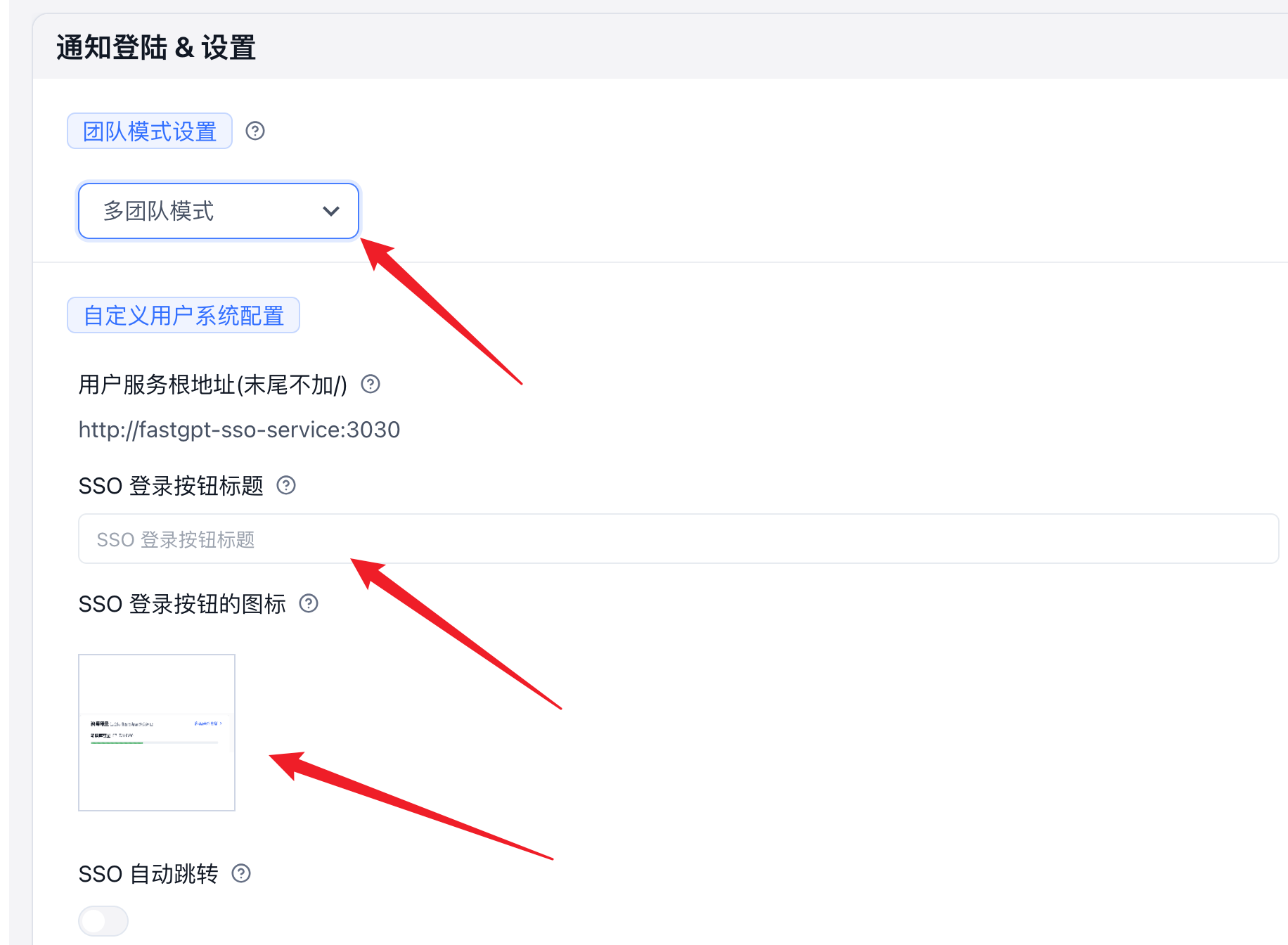
2. Configure button text, icons, etc. in the commercial version admin panel.

WeComDingTalkLark
WeComDingTalkLark

3. Enable Member Sync (Optional)

If you need to sync members from an external system, you can enable member sync. For team mode details, see: Team Mode Documentation

4. Optional Configuration

  1. Automatic scheduled member sync

Set the fastgpt-pro environment variable to enable automatic member sync:

env:
  - 'SYNC_MEMBER_CRON=0 0 * * *' # Cron expression, runs daily at 00:00. Note: uses UTC (timezone 0). For example, to sync at 12:00 Beijing time, set this to "0 4 * * *" (UTC 04:00)

Built-in Provider Configuration Examples

Lark

1. Get Parameters

App ID and App Secret

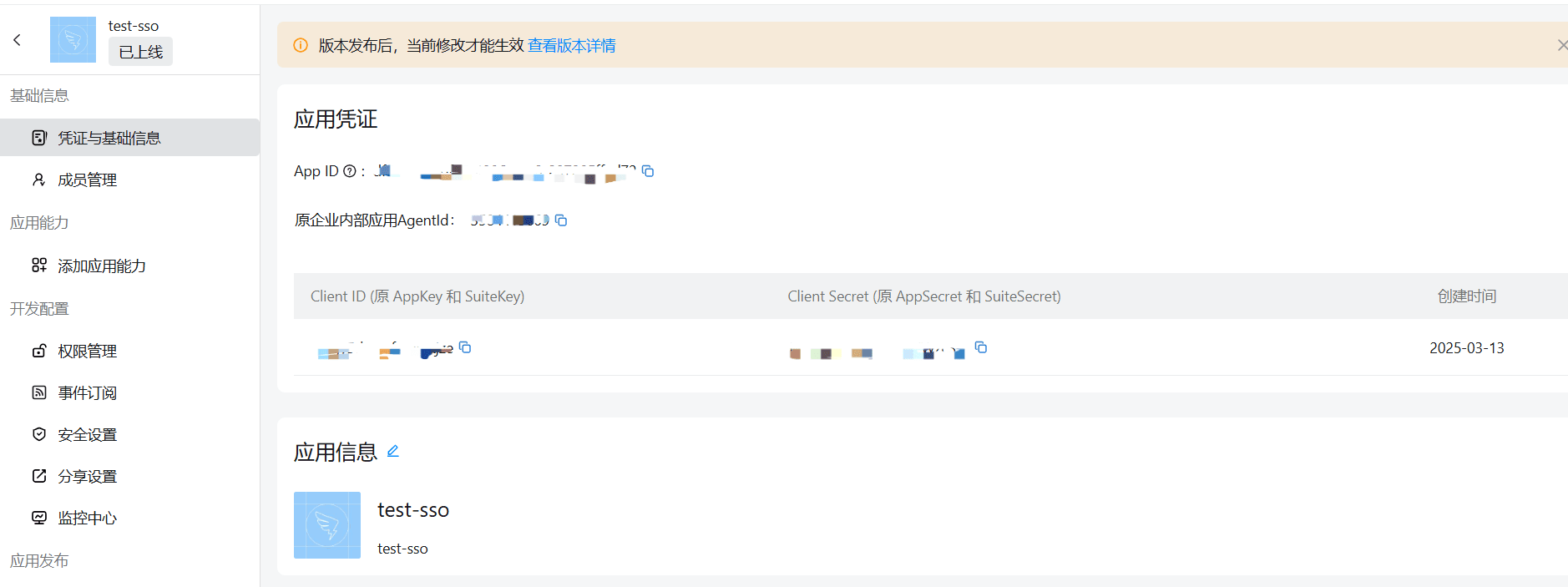
Go to the developer console, click on your enterprise self-built app, and view the app credentials on the Credentials & Basic Info page.

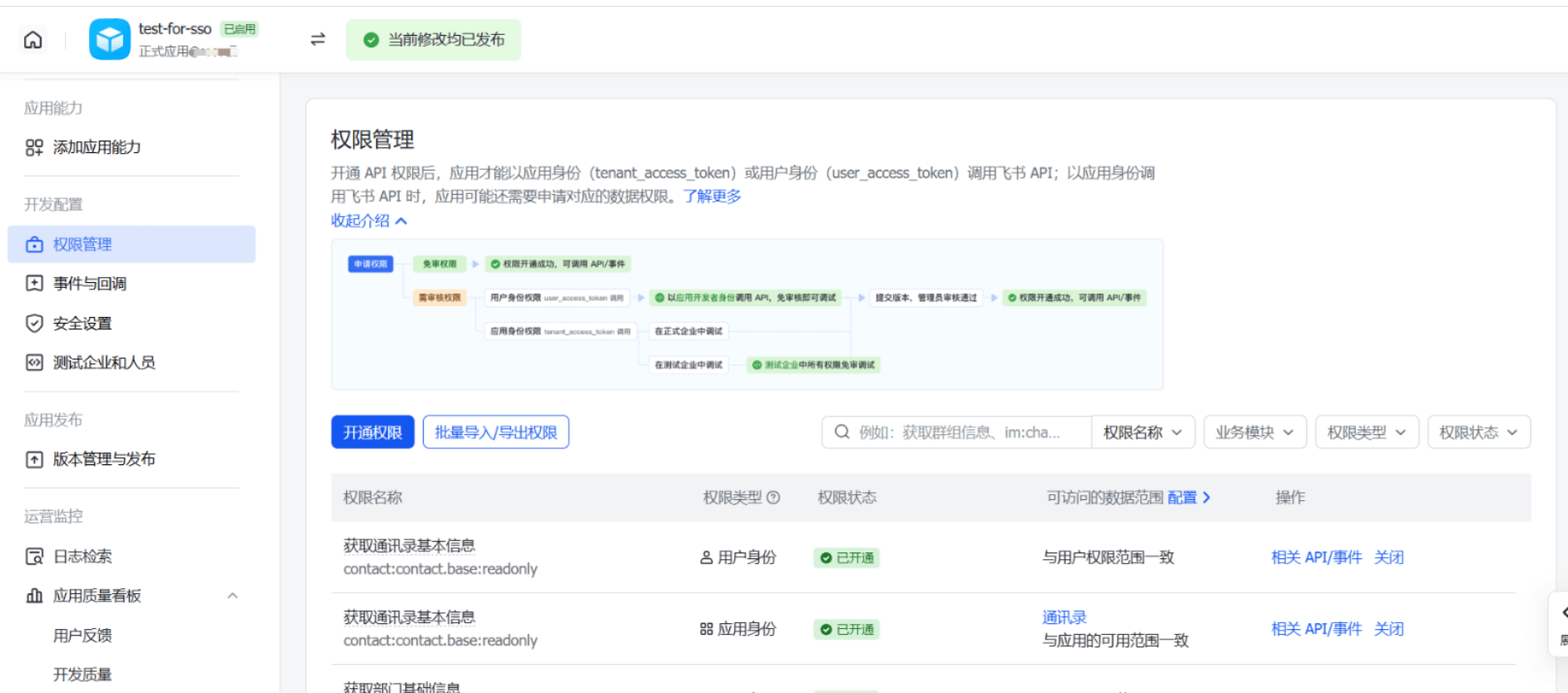
2. Permission Configuration

Go to the developer console, click on your enterprise self-built app, and enable permissions on the Permission Management page under Development Configuration.

You can use the Batch Import/Export Permissions feature to import the following permission configuration:

{
  "scopes": {
    "tenant": [
      "contact:user.phone:readonly",
      "contact:contact.base:readonly",
      "contact:department.base:readonly",
      "contact:department.organize:readonly",
      "contact:user.base:readonly",
      "contact:user.department:readonly",
      "contact:user.email:readonly",
      "contact:user.employee_id:readonly"
    ],
    "user": []
  }
}

Note: The accessible data scope must be set to visible to all members.

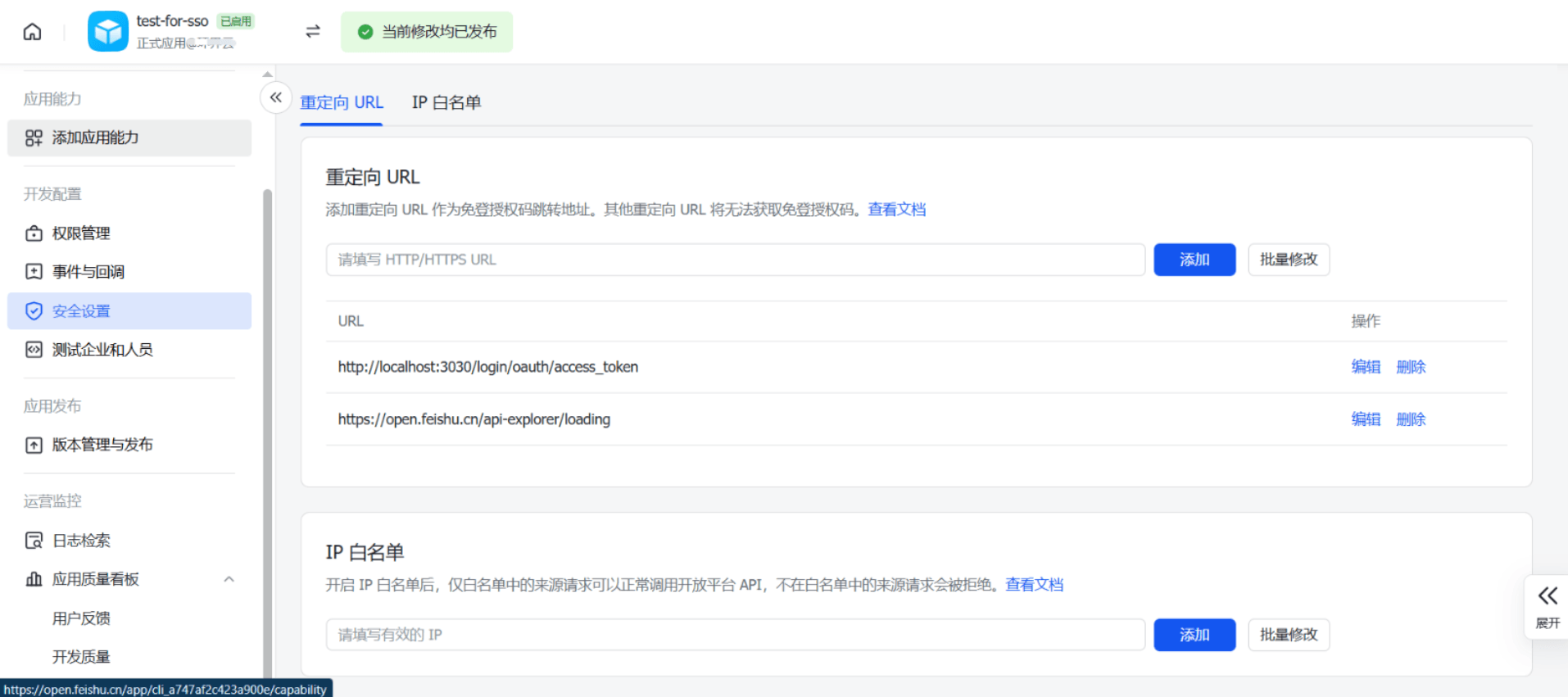
3. Redirect URL

Go to the developer console, click on your enterprise self-built app, and set the redirect URL in Security Settings under Development Configuration. The redirect URL should follow the format https://www.fastgpt.cn/login/provider — replace the domain with your publicly accessible FastGPT domain.

4. yml Configuration Example

fastgpt-sso:
  image: registry.cn-hangzhou.aliyuncs.com/fastgpt/fastgpt-sso-service:v4.9.0
  container_name: fastgpt-sso
  restart: always
  networks:
    - fastgpt
  environment:
    - SSO_PROVIDER=feishu
    - AUTH_TOKEN=xxxxx
    # OAuth endpoint (for private Lark deployments, replace with your private address; same below)
    - SSO_TARGET_URL=https://accounts.feishu.cn/open-apis/authen/v1/authorize
    # Token endpoint
    - FEISHU_TOKEN_URL=https://open.feishu.cn/open-apis/authen/v2/oauth/token
    # User info endpoint
    - FEISHU_GET_USER_INFO_URL=https://open.feishu.cn/open-apis/authen/v1/user_info
    # Redirect address — must match the URL from step 3 exactly
    - FEISHU_REDIRECT_URI=https://fastgpt.cn/login/provider
    # Lark App ID, usually starts with cli
    - FEISHU_APP_ID=xxx
    # Lark App Secret
    - FEISHU_APP_SECRET=xxx

DingTalk

1. Get Parameters

CLIENT_ID and CLIENT_SECRET

Go to the DingTalk Open Platform, click App Development, select your app, and record the Client ID and Client Secret on the Credentials & Basic Info page.

2. Permission Configuration

Go to the DingTalk Open Platform, click App Development, select your app, and manage permissions on the Permission Management page under Development Configuration. Required permissions:

  1. Personal phone number information
  2. Contact personal information read permission
  3. Basic permission to obtain DingTalk open interface user access credentials

3. Redirect URL

Go to the DingTalk Open Platform, click App Development, select your app, and configure on the Security Settings page under Development Configuration. Two items need to be filled in:

  1. Server egress IP (list of server IPs calling DingTalk server-side APIs)
  2. Redirect URL (callback domain)

4. yml Configuration Example

fastgpt-sso:
  image: registry.cn-hangzhou.aliyuncs.com/fastgpt/fastgpt-sso-service:v4.9.0
  container_name: fastgpt-sso
  restart: always
  networks:
    - fastgpt
  environment:
    - SSO_PROVIDER=dingtalk
    - AUTH_TOKEN=xxxxx
    # OAuth endpoint
    - SSO_TARGET_URL=https://login.dingtalk.com/oauth2/auth
    # Token endpoint
    - DINGTALK_TOKEN_URL=https://api.dingtalk.com/v1.0/oauth2/userAccessToken
    # User info endpoint
    - DINGTALK_GET_USER_INFO_URL=https://oapi.dingtalk.com/v1.0/contact/users/me
    # DingTalk App ID
    - DINGTALK_CLIENT_ID=xxx
    # DingTalk App Secret
    - DINGTALK_CLIENT_SECRET=xxx

WeCom

After the WeCom member sync logic is updated, redeploy the fastgpt-sso-service relay service using the published latest image.

1. Get Parameters

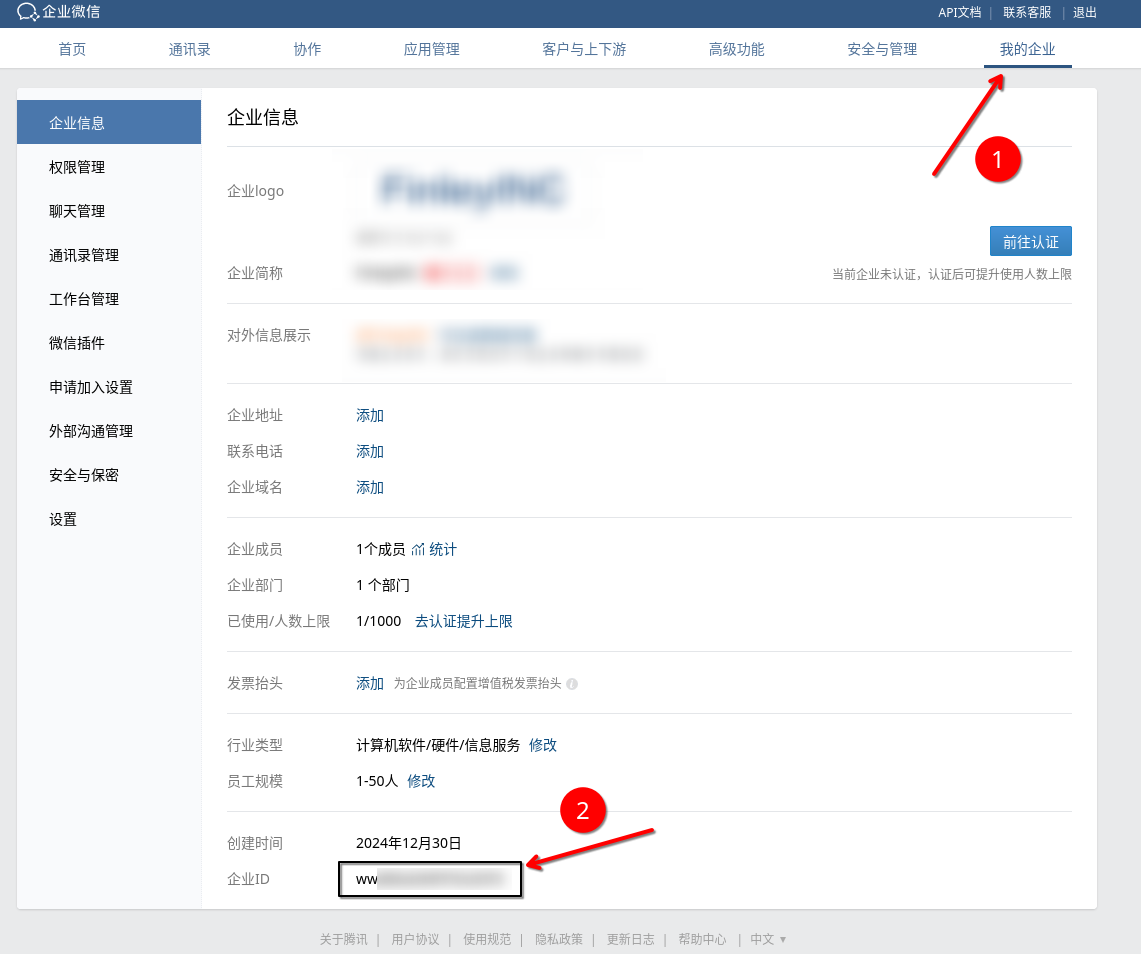
  1. Enterprise CorpID

    a. Log in to the WeCom admin console with an admin account: https://work.weixin.qq.com/wework_admin/loginpage_wx

    b. Go to the "My Enterprise" page and find the Enterprise ID

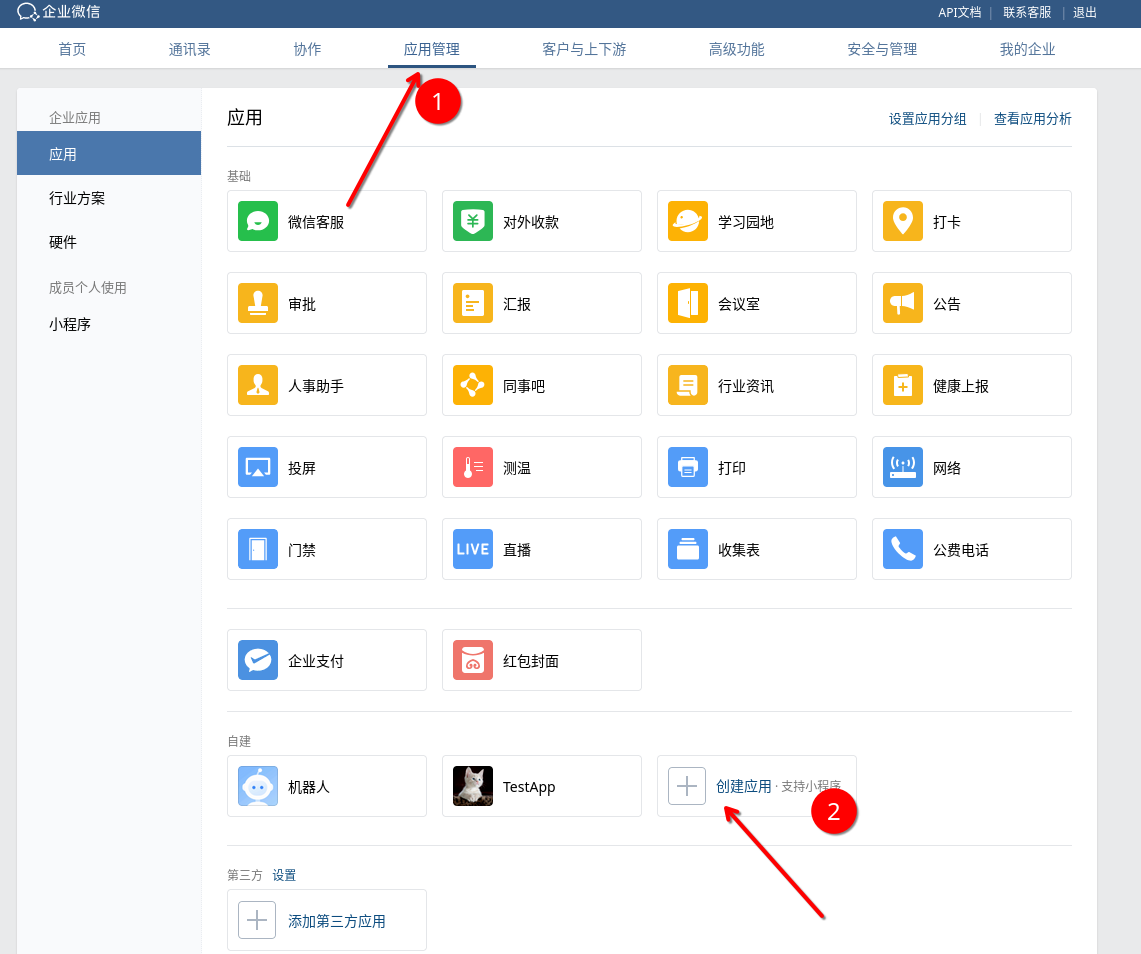
  2. Create an internal app for FastGPT:

    a. Get the app's AgentID and Secret

    b. The app's visibility scope determines the WeCom member sync scope. Include at least the departments that should be synchronized; to synchronize the entire enterprise, select the root department (all visible).

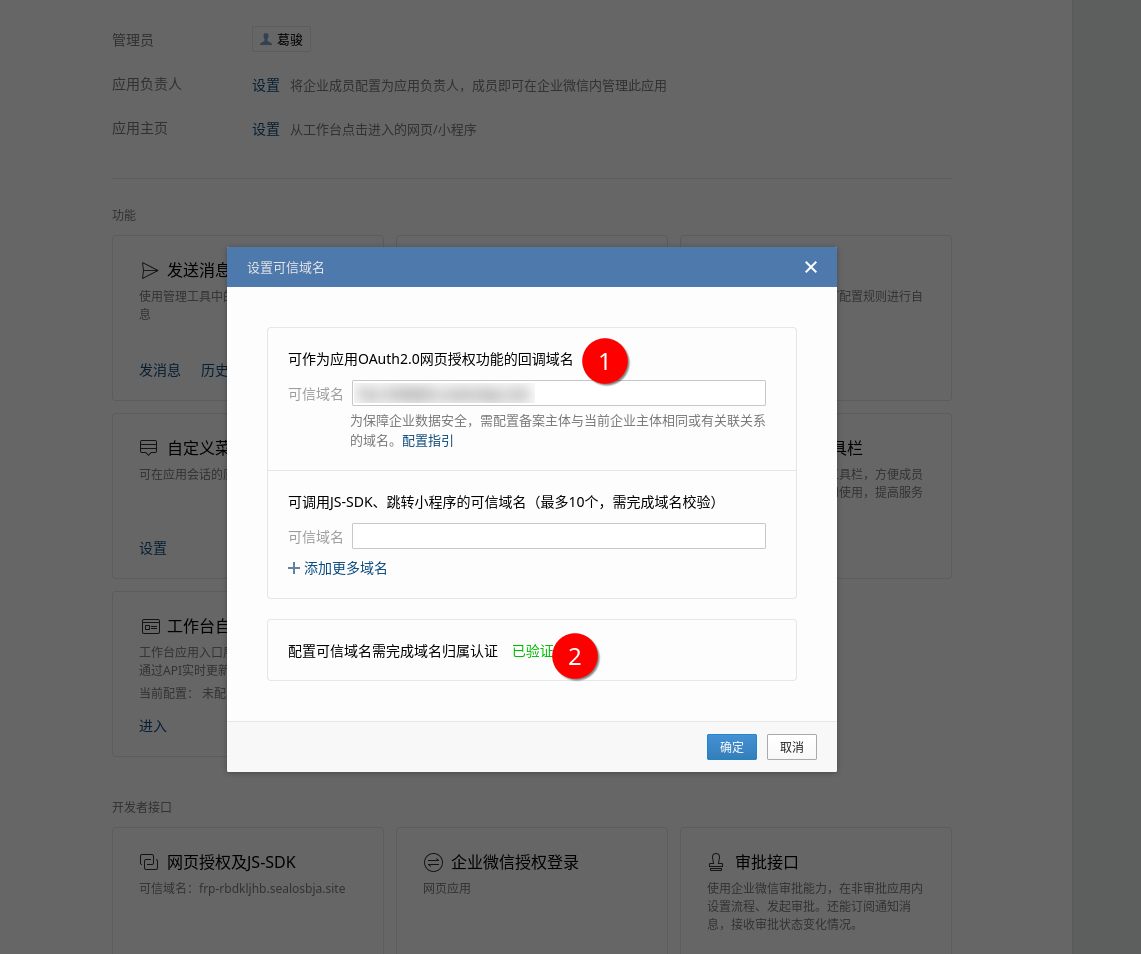
  3. A domain name with the following requirements:

    a. Resolves to a publicly accessible server

    b. Can serve static files at the root path (for domain ownership verification — follow the prompts, you only need to host one static file, which can be removed after verification)

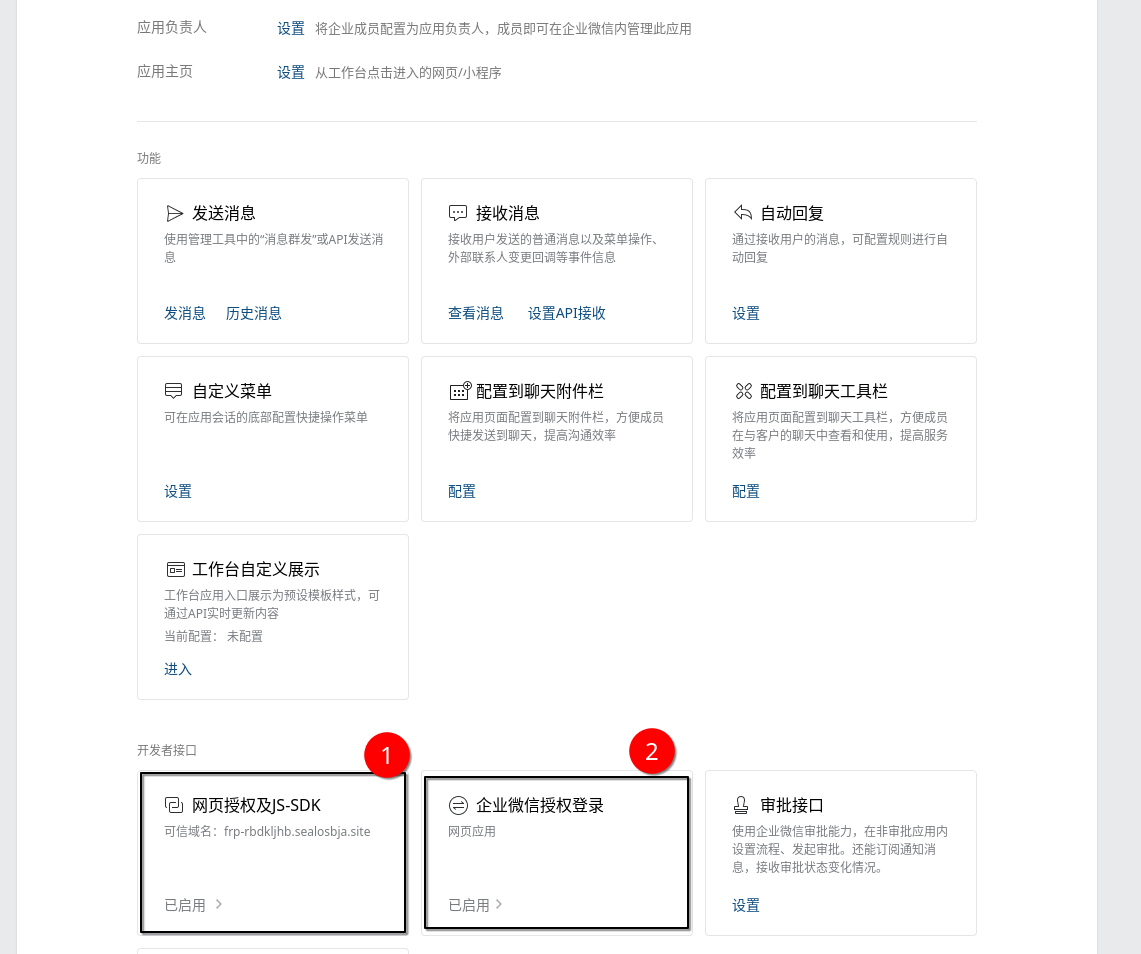
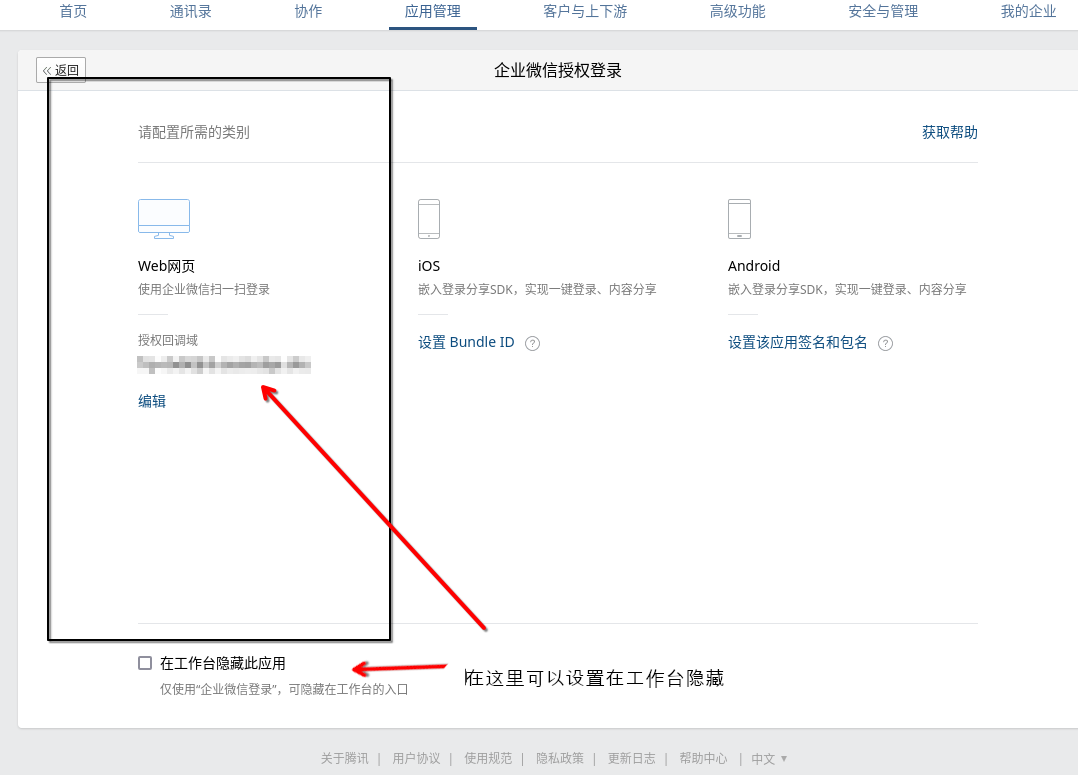
    c. Configure web authorization, JS-SDK, and WeCom authorization login

    d. You can set "Hide app in Studio" at the bottom of the WeCom Authorization Login page

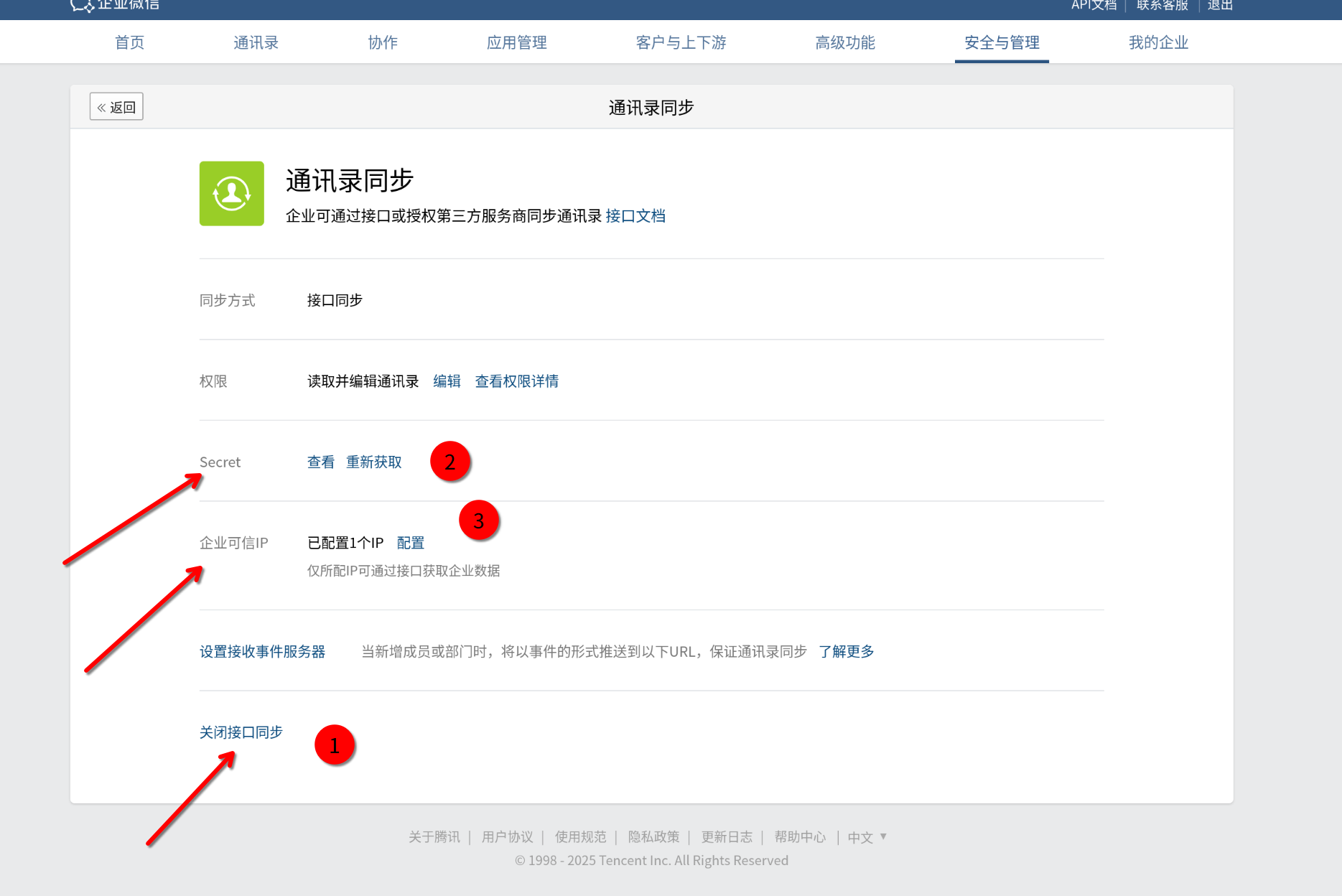
  4. Get the "Contact Sync Assistant" secret

    Retrieving contacts and organization member IDs requires the "Contact Sync Assistant" secret

    Security & Management -- Management Tools -- Contact Sync

  5. Enable interface sync

  6. Get the Secret

  7. Configure enterprise trusted IPs

2. Use the latest image to deploy the fastgpt-sso relay service

WeCom SSO login uses the app Secret, while member synchronization uses the Contact Sync Assistant Secret. Pull the published latest image and recreate the service:

docker compose pull fastgpt-sso
docker compose up -d --force-recreate fastgpt-sso

3. yml Configuration Example

3. yml Configuration Example

fastgpt-sso:
  image: registry.cn-hangzhou.aliyuncs.com/fastgpt/fastgpt-sso-service:latest
  container_name: fastgpt-sso
  restart: always
  networks:
    - fastgpt
  environment:
    - AUTH_TOKEN=xxxxx
    - SSO_PROVIDER=wecom
    # OAuth endpoint, used in WeCom client
    - WECOM_TARGET_URL_OAUTH=https://open.weixin.qq.com/connect/oauth2/authorize
    # SSO endpoint, QR code scan
    - WECOM_TARGET_URL_SSO=https://login.work.weixin.qq.com/wwlogin/sso/login
    # Get user ID (returns ID only)
    - WECOM_GET_USER_ID_URL=https://qyapi.weixin.qq.com/cgi-bin/auth/getuserinfo
    # Get detailed user info (everything except name)
    - WECOM_GET_USER_INFO_URL=https://qyapi.weixin.qq.com/cgi-bin/auth/getuserdetail
    # Get user info (has name, no other info)
    - WECOM_GET_USER_NAME_URL=https://qyapi.weixin.qq.com/cgi-bin/user/get
    # Get department ID list
    - WECOM_GET_DEPARTMENT_LIST_URL=https://qyapi.weixin.qq.com/cgi-bin/department/list
    # Get user ID list
    - WECOM_GET_USER_LIST_URL=https://qyapi.weixin.qq.com/cgi-bin/user/list_id
    # WeCom CorpId
    - WECOM_CORPID=
    # WeCom App AgentId, usually 1000xxx
    - WECOM_AGENTID=
    # WeCom App Secret
    - WECOM_APP_SECRET=
    # Contact Sync Assistant Secret
    - WECOM_SYNC_SECRET=

4. WeCom member sync rules

  • /org/list returns departments visible to the WeCom app.
  • /user/list still retrieves members through the Contact Sync Assistant, but keeps only members who belong to at least one department visible to the app.
  • A member's department list is filtered to visible departments; a member who belongs only to invisible departments is not synchronized to FastGPT.
  • After changing the app visibility scope or image version, run member synchronization again. You can also call the endpoints below to verify the result first.

Standard OAuth 2.0

We provide OAuth 2.0 integration support using the authorization code grant from RFC 6749. References:

Parameter Requirements

Three Endpoints

We provide a standard OAuth 2.0 integration flow requiring three endpoints:

  1. Login authorization endpoint (users are redirected here with parameters after clicking the SSO button), e.g., http://example.com/oauth/authorize
    curl -X GET\
    "http://example.com/oauth/authorize?response_type=code&client_id=s6BhdRkqt3&state=xyz&redirect_uri=https%3A%2F%2Ffastgpt.cn%2Flogin%2Fprovider"
    After entering credentials, users are redirected to redirect_uri with a code parameter: https://fastgpt.cn/login/provider?code=4/P7qD2qAz4&state=xyz
  2. Access token endpoint. After obtaining the code, make a server-side request to this endpoint to get the access_token, e.g., http://example.com/oauth/access_token
    curl -X POST\
        -H "Content-Type: application/x-www-form-urlencoded"\
    "http://example.com/oauth/access_token?grant_type=authorization_code&client_id=s6BhdRkqt3&client_secret=xxx&code=4/P7qD2qAz4&redirect_uri=https%3A%2F%2Ffastgpt.cn%2Flogin%2Fprovider"
    Note: Content-Type must be application/x-www-form-urlencoded, not application/json
  3. User info endpoint, requires passing the access_token, e.g., http://example.com/oauth/user_info
    curl -X GET\
        -H "Authorization: Bearer 4/P7qD2qAz4"\
        "http://example.com/oauth/user_info"
    Note: access_token is passed as the Authorization header in the format: Bearer xxxx
Parameter Configuration
  • CLIENT_ID: Required
  • CLIENT_SECRET: Optional, skip if not needed
  • SCOPE: Optional, skip if not needed

The redirect_uri parameter is auto-populated based on the runtime environment

Other fixed parameters like grant_type and response_type are auto-populated

Configuration Example

fastgpt-sso:
  image: registry.cn-hangzhou.aliyuncs.com/fastgpt/fastgpt-sso-service:v4.9.0
  container_name: fastgpt-sso
  restart: always
  networks:
    - fastgpt
  environment:
    - SSO_PROVIDER=oauth2
    - AUTH_TOKEN=xxxxx
    # OAuth2.0
    # === Request URLs ===
    # 1. OAuth2 login authorization URL (required)
    - OAUTH2_AUTHORIZE_URL=
    # 2. OAuth2 access token URL (required)
    - OAUTH2_TOKEN_URL=
    # 3. OAuth2 user info URL (required)
    - OAUTH2_USER_INFO_URL=
    # === Parameters ===
    # 1. client_id (required)
    - OAUTH2_CLIENT_ID=
    # 2. client_secret (optional)
    - OAUTH2_CLIENT_SECRET=
    # 3. scope (optional)
    - OAUTH2_SCOPE=
    # === Field Mapping ===
    # OAuth2 username field mapping (required)
    - OAUTH2_USERNAME_MAP=
    # OAuth2 avatar field mapping (optional)
    - OAUTH2_AVATAR_MAP=
    # OAuth2 member name field mapping (optional)
    - OAUTH2_MEMBER_NAME_MAP=
    # OAuth2 contact field mapping (optional)
    - OAUTH2_CONTACT_MAP=

LDAP User and Organization Sync

The LDAP provider only synchronizes users and organizations. It does not provide login. The recommended setup is to use separate providers for login and synchronization:

fastgpt-sso:
  image: registry.cn-hangzhou.aliyuncs.com/fastgpt/fastgpt-sso-service:v4.14.16
  environment:
    - SSO_PROVIDER=oauth2
    - SSO_SYNC_PROVIDER=ldap
    - AUTH_TOKEN=replace-with-a-sync-token
    - LDAP_URL=ldap://ldap.example.com:389
    - LDAP_BASE_DN=dc=example,dc=com
    - LDAP_BIND_DN=cn=fastgpt-sync,dc=example,dc=com
    - LDAP_BIND_PASSWORD=replace-with-readonly-password
    - LDAP_USER_BASE_DN=ou=people,dc=example,dc=com
    - LDAP_USER_FILTER=(&(objectClass=inetOrgPerson)(uid=*))
    - LDAP_USER_USERNAME_ATTRIBUTE=uid
    - LDAP_USER_MEMBER_NAME_ATTRIBUTE=displayName
    - LDAP_USER_CONTACT_ATTRIBUTE=mail
    - LDAP_USERNAME_PREFIX=ldap-
    - LDAP_MEMBERSHIP_MODE=user_attribute
    - LDAP_USER_ATTRIBUTE_ORG_BASE_DN=ou=company,dc=example,dc=com
    - LDAP_USER_ATTRIBUTE_ORG_FILTER=(objectClass=organizationalUnit)
    - LDAP_USER_ATTRIBUTE_ORG_NAME_ATTRIBUTE=ou
    - LDAP_USER_ATTRIBUTE_MEMBERSHIP_ATTRIBUTE=ou
    - LDAP_USER_ATTRIBUTE_MEMBERSHIP_VALUE_TYPE=name_or_dn

SSO_PROVIDER remains responsible for login. Setting SSO_SYNC_PROVIDER=ldap makes /user/list and /org/list use LDAP. LDAP does not provide login endpoints; do not set SSO_PROVIDER=ldap when SSO login is required.

FastGPT Configuration

fastgpt-pro must reach the SSO service and use the same token as SSO-service.AUTH_TOKEN:

env:
  - EXTERNAL_USER_SYSTEM_BASE_URL=http://fastgpt-sso:3000
  - EXTERNAL_USER_SYSTEM_AUTH_TOKEN=replace-with-a-sync-token
  - SYNC_MEMBER_CRON=0 0 * * *

Enable member synchronization in the commercial admin panel. SYNC_MEMBER_CRON uses UTC; leaving it empty disables scheduled synchronization.

LDAP Connection Configuration

Environment variableRequiredDefaultDescription
LDAP_URLYes-Only ldap:// and ldaps:// are supported; do not use https://
LDAP_BASE_DNYes-Default search base DN
LDAP_BIND_DNYes-Read-only synchronization account DN
LDAP_BIND_PASSWORDYes-Synchronization account password
LDAP_USER_BASE_DNNoLDAP_BASE_DNUser search base
LDAP_USER_FILTERNo(&(objectClass=inetOrgPerson)(uid=*))LDAP user filter
LDAP_USER_USERNAME_ATTRIBUTENouidUser identifier attribute
LDAP_USER_MEMBER_NAME_ATTRIBUTENodisplayNameDisplay name attribute
LDAP_USER_CONTACT_ATTRIBUTENomailContact attribute
LDAP_USER_AVATAR_ATTRIBUTENoEmptyAvatar attribute; empty disables sync
LDAP_USERNAME_PREFIXNoldap-Username prefix
LDAP_PAGE_SIZENo500LDAP page size
LDAP_TIMEOUT_MSNo10000LDAP operation timeout in milliseconds
LDAP_CONNECT_TIMEOUT_MSNo10000LDAP connection timeout in milliseconds

For ldaps://, configure LDAP_TLS_REJECT_UNAUTHORIZED, LDAP_TLS_CA_FILE, LDAP_TLS_CA, LDAP_TLS_CERT_FILE, LDAP_TLS_KEY_FILE, and LDAP_TLS_SERVERNAME as needed. Use LDAP_TLS_CA_FILE for a private CA. Client certificate and key must be configured together.

Membership Modes

LDAP_MEMBERSHIP_MODE supports four modes:

ModeRelationshipMain configuration
user_attributeA user attribute, usually ou, points to an organizationLDAPUSER_ATTRIBUTE*
group_member_dnA group attribute, usually member, contains user DNsLDAPGROUP_MEMBER_DN*
user_member_ofA user attribute, usually memberOf, contains group DNsLDAPUSER_MEMBER_OF*
posix_member_uidA group attribute, usually memberUid, contains user identifiersLDAPPOSIX_MEMBER_UID*

1. user_attribute: user attribute points to an organization

LDAP_MEMBERSHIP_MODE=user_attribute
LDAP_USER_ATTRIBUTE_ORG_BASE_DN=ou=company,dc=example,dc=com
LDAP_USER_ATTRIBUTE_ORG_FILTER=(objectClass=organizationalUnit)
LDAP_USER_ATTRIBUTE_ORG_NAME_ATTRIBUTE=ou
LDAP_USER_ATTRIBUTE_MEMBERSHIP_ATTRIBUTE=ou
LDAP_USER_ATTRIBUTE_MEMBERSHIP_VALUE_TYPE=name_or_dn

name_or_dn first tries a DN match and then falls back to the organization name.

2. group_member_dn: groups contain user DNs

dn: cn=engineering,ou=groups,dc=example,dc=com
objectClass: groupOfNames
cn: engineering
member: uid=alice,ou=people,dc=example,dc=com
LDAP_MEMBERSHIP_MODE=group_member_dn
LDAP_GROUP_MEMBER_DN_ORG_BASE_DN=ou=groups,dc=example,dc=com
LDAP_GROUP_MEMBER_DN_ORG_FILTER=(objectClass=groupOfNames)
LDAP_GROUP_MEMBER_DN_ORG_NAME_ATTRIBUTE=cn
LDAP_GROUP_MEMBER_DN_MEMBER_ATTRIBUTE=member
LDAP_GROUP_MEMBER_DN_MEMBER_VALUE_TYPE=dn

For groupOfUniqueNames, change the filter to objectClass=groupOfUniqueNames and usually set the member attribute to uniqueMember.

3. user_member_of: users contain group DNs

LDAP_MEMBERSHIP_MODE=user_member_of
LDAP_USER_MEMBER_OF_ORG_BASE_DN=ou=groups,dc=example,dc=com
LDAP_USER_MEMBER_OF_ORG_FILTER=(objectClass=groupOfNames)
LDAP_USER_MEMBER_OF_ORG_NAME_ATTRIBUTE=cn
LDAP_USER_MEMBER_OF_MEMBERSHIP_ATTRIBUTE=memberOf
LDAP_USER_MEMBER_OF_MEMBERSHIP_VALUE_TYPE=dn

User entries must contain the memberOf attribute. Some OpenLDAP deployments require the memberof overlay.

4. posix_member_uid: POSIX groups contain user UIDs

dn: cn=engineering,ou=groups,dc=example,dc=com
objectClass: posixGroup
cn: engineering
memberUid: alice
LDAP_MEMBERSHIP_MODE=posix_member_uid
LDAP_POSIX_MEMBER_UID_ORG_BASE_DN=ou=groups,dc=example,dc=com
LDAP_POSIX_MEMBER_UID_ORG_FILTER=(objectClass=posixGroup)
LDAP_POSIX_MEMBER_UID_ORG_NAME_ATTRIBUTE=cn
LDAP_POSIX_MEMBER_UID_MEMBER_ATTRIBUTE=memberUid
LDAP_POSIX_MEMBER_UID_USER_ID_ATTRIBUTE=uid
LDAP_POSIX_MEMBER_UID_MEMBER_VALUE_TYPE=username

Sync Results and Limitations

  • Organization IDs use normalized LDAP DNs, and parentId is derived from DN hierarchy.
  • If the final organization list has multiple parentless organizations, a virtual root with id ldap-virtual-root and name ROOT is inserted.
  • The user result uses orgs for organization IDs. Synced usernames default to ldap- plus the LDAP user identifier.
  • The login provider must use the same prefix and identifier rule.
  • Nested groups are not recursively expanded, and dynamic groups are not parsed.

Manually Check the Sync Interfaces

curl -H 'Authorization: Bearer replace-with-a-sync-token' http://fastgpt-sso:3000/org/list
curl -H 'Authorization: Bearer replace-with-a-sync-token' http://fastgpt-sso:3000/user/list

Standard Interface Documentation

Below is the standard interface documentation for SSO and member sync in FastGPT-pro. If you need to integrate with a non-standard system, refer to this section for development.

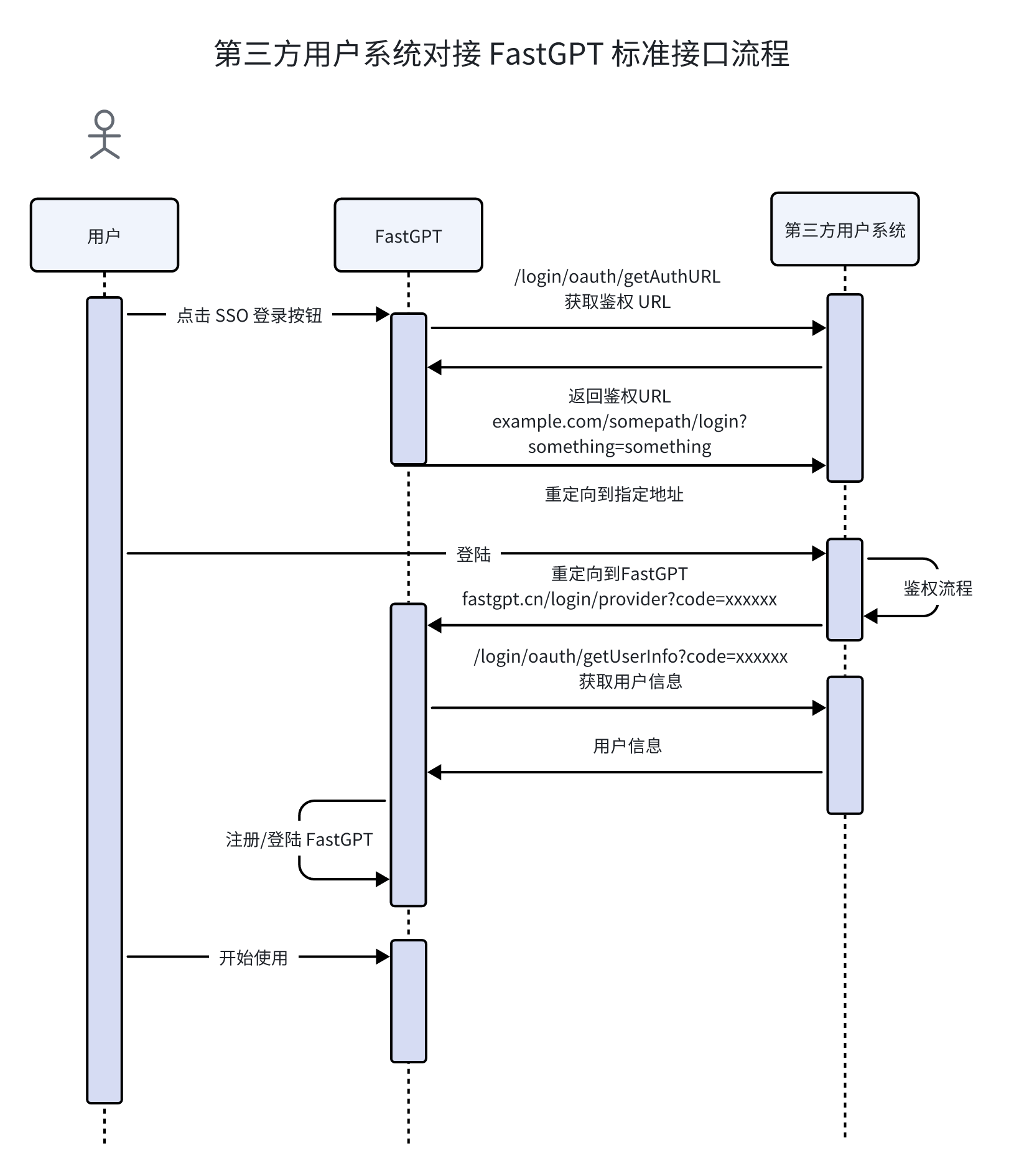
FastGPT provides the following standard interfaces:

  1. https://example.com/login/oauth/getAuthURL - Get the authorization redirect URL
  2. https://example.com/login/oauth/getUserInfo?code=xxxxx - Consume the code and exchange it for user info
  3. https://example.com/org/list - Get the organization list
  4. https://example.com/user/list - Get the member list

Get SSO Login Redirect URL

Returns a redirect login URL. FastGPT will automatically redirect to this URL. The redirect_uri is automatically appended to the URL query string.

curl -X GET "https://redict.example/login/oauth/getAuthURL?redirect_uri=xxx&state=xxxx" \
-H "Authorization: Bearer your_token_here" \
-H "Content-Type: application/json"

Success:

{
  "success": true,
  "message": "",
  "authURL": "https://example.com/somepath/login/oauth?redirect_uri=https%3A%2F%2Ffastgpt.cn%2Flogin%2Fprovider%0A"
}

Failure:

{
  "success": false,
  "message": "Error message",
  "authURL": ""
}

SSO Get User Info

This interface accepts a code parameter for authentication, consumes the code, and returns user info.

curl -X GET "https://oauth.example/login/oauth/getUserInfo?code=xxxxxx" \
-H "Authorization: Bearer your_token_here" \
-H "Content-Type: application/json"

Success:

{
  "success": true,
  "message": "",
  "username": "fastgpt-123456789",
  "avatar": "https://example.webp",
  "contact": "+861234567890",
  "memberName": "Member name (optional)"
}

Failure:

{
  "success": false,
  "message": "Error message",
  "username": "",
  "avatar": "",
  "contact": ""
}

Get Organizations

curl -X GET "https://example.com/org/list" \
-H "Authorization: Bearer your_token_here" \
-H "Content-Type: application/json"

Warning: Only one root department can exist. If your system has multiple root departments, you need to add a virtual root department first. Return type:

type OrgListResponseType = {
  message?: string; // Error message
  success: boolean;
  orgList: {
    id: string; // Unique department ID
    name: string; // Name
    parentId: string; // parentId — empty string for root department
  }[];
};
{
  "success": true,
  "message": "",
  "orgList": [
    {
      "id": "od-125151515",
      "name": "Root Department",
      "parentId": ""
    },
    {
      "id": "od-51516152",
      "name": "Sub Department",
      "parentId": "od-125151515"
    }
  ]
}

Get Members

curl -X GET "https://example.com/user/list" \
-H "Authorization: Bearer your_token_here" \
-H "Content-Type: application/json"

Return type:

type UserListResponseListType = {
  message?: string; // Error message
  success: boolean;
  userList: {
    username: string; // Unique ID. username must match the username returned by the SSO interface. Must include a prefix, e.g., sync-aaaaa, consistent with the SSO interface prefix
    memberName?: string; // Name, used as tmbname
    avatar?: string;
    contact?: string; // email or phone number
    orgs?: string[]; // IDs of organizations the member belongs to. Pass [] if no organization
  }[];
};

curl example

{
  "success": true,
  "message": "",
  "userList": [
    {
      "username": "fastgpt-123456789",
      "memberName": "John Doe",
      "avatar": "https://example.webp",
      "contact": "+861234567890",
      "orgs": ["od-125151515", "od-51516152"]
    },
    {
      "username": "fastgpt-12345678999",
      "memberName": "Jane Smith",
      "avatar": "",
      "contact": "",
      "orgs": ["od-125151515"]
    }
  ]
}

How to Integrate Non-Standard Systems

  1. Self-development: Build according to the standard interfaces provided by FastGPT, then enter the deployed service address into fastgpt-pro. You can use this template repository as a starting point: fastgpt-sso-template
  2. Custom development by the FastGPT team: a. Provide the system's SSO documentation, member and organization retrieval documentation, and an external test address. b. In fastgpt-sso-service, add the corresponding provider and environment variables, and write the integration code.
Edit on GitHub

File Updated