
File Input
FastGPT file input feature overview
Starting from version 4.8.9, FastGPT supports configuring file uploads in both Basic Mode and Workflows. This guide covers how to use file input and explains the difference between document parsing and multimodal file handling.
Using in Basic Mode
When file upload is enabled in Basic Mode, it uses tool-calling mode — the model decides whether to read the file content.
Find the file upload option on the left panel and click the Enable/Disable toggle to open the configuration dialog.

Once enabled, a file selection icon appears in the chat input area. Click it to select files for upload.

Behavior
Starting from version 4.8.13, Basic Mode forces file parsing and injects the content into the system prompt, preventing cases where the model skips reading the file during multi-turn conversations.
Using in Workflows
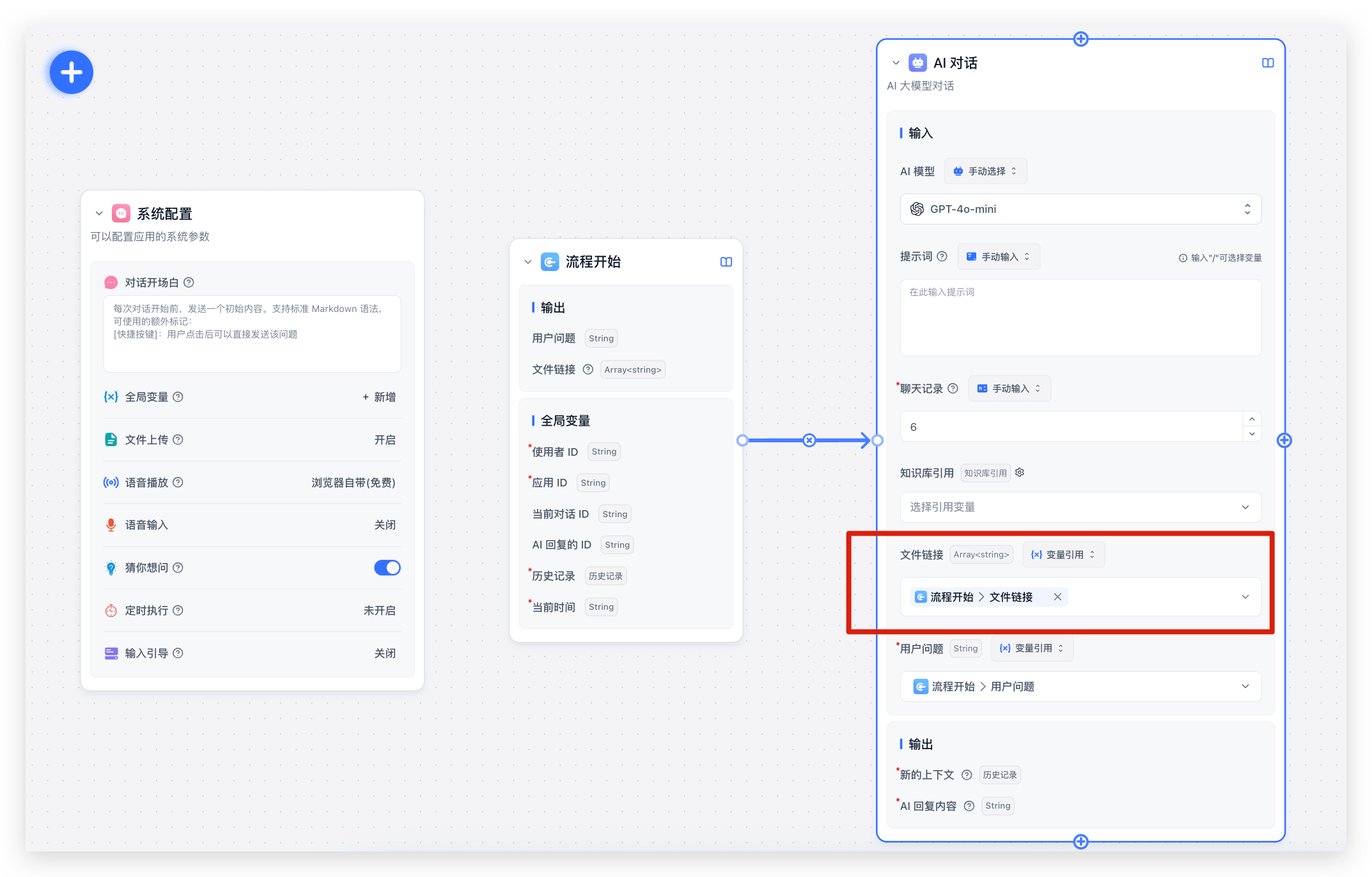
In Workflows, find the File Input option in the system configuration panel and click the Enable/Disable toggle to open the configuration dialog.

There are many ways to use files in Workflows. The simplest approach, shown below, connects document parsing via tool calling — achieving the same result as Basic Mode.
 |  |
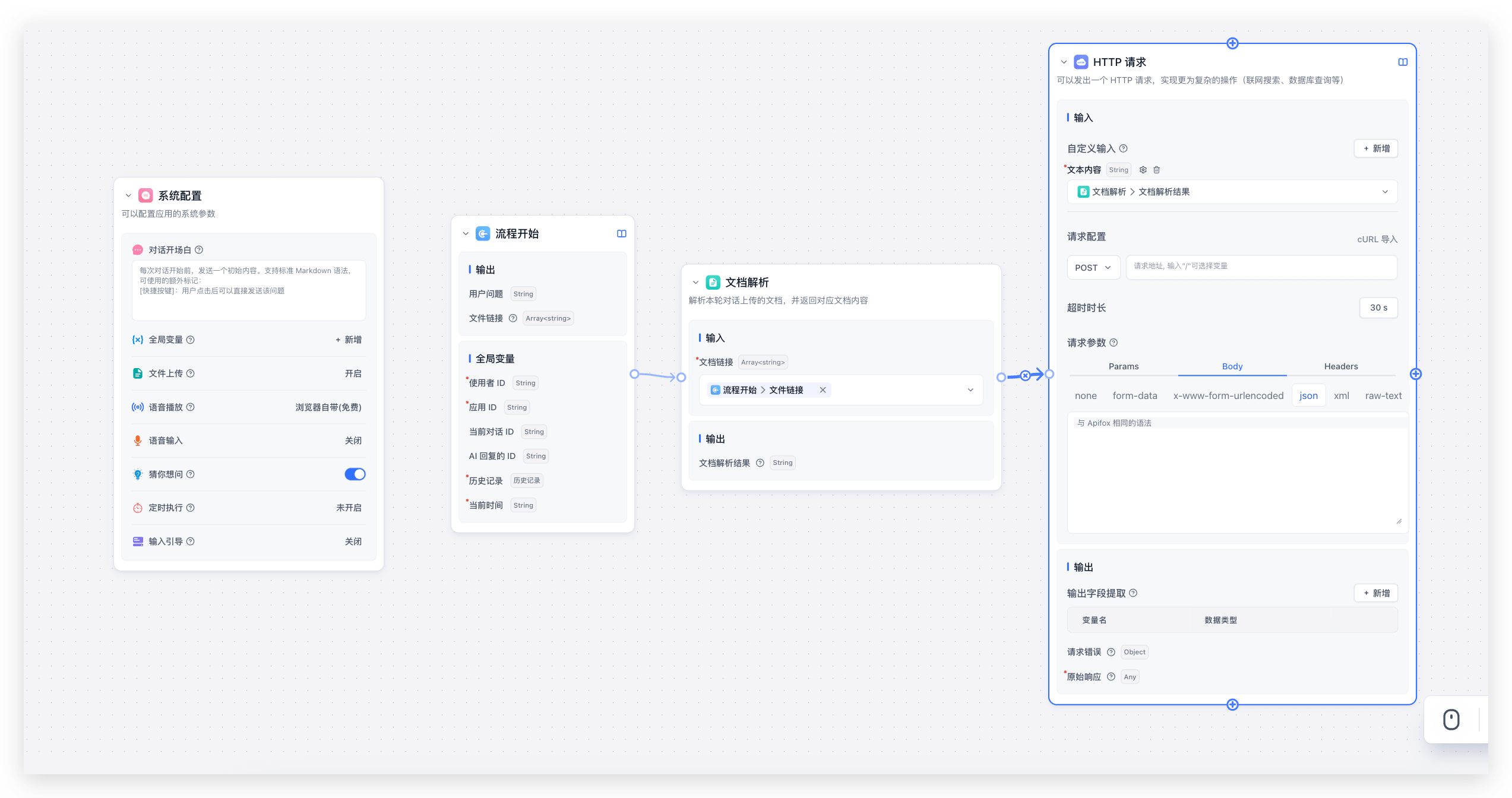
You can also use Workflows to extract or analyze document content, then pass the results to HTTP requests or other nodes to build a document processing pipeline.
How Document Parsing Works
Unlike multimodal recognition, LLMs currently cannot parse regular documents directly. All document "understanding" is achieved by converting documents to text and injecting it into the prompt. The following FAQs explain how this works — understanding the mechanics helps you use document parsing more effectively in Workflows.
How are uploaded files stored in the database?
In FastGPT's chat history, messages with role=user store their value in this structure:
type UserChatItemValueItemType = {
  type: 'text' | 'file';
  text?: {
    content: string;
  };
  file?: {
    type: 'image' | 'audio' | 'video' | 'file';
    name?: string;
    key?: string;
    url: string;
  };
};
Uploaded files are stored as URLs — parsed document content is not stored.
How are images, audio, and video handled?
The document parsing node does not parse multimodal files such as images, audio, or video. These files should be handled by an LLM that supports the corresponding multimodal capability, with multimodal recognition enabled in AI Settings.
In practice, file input has two different handling paths:
- Document parsing: handles document files such as PDF, Word, Excel, Markdown, and HTML, converts their content to text, and provides that text to the AI.
- Multimodal recognition: handles media files such as images, audio, and video. FastGPT converts them into model-readable input, and a model with the corresponding capability reads them.
How does the document parsing node work?
The document parsing node accepts an array<string> input (file URLs) and outputs a string (the parsed content).
- The node only parses URLs with document-type file extensions. If you upload both documents and multimodal files, multimodal files are ignored.
- The document parsing node only processes files from the current workflow run, not files from chat history.
- How multiple documents are concatenated:
Multiple files are concatenated using the following template — filename + content, separated by \n******\n:
File: ${filename}
<Content>
${content}
</Content>
How to use document parsing in AI nodes
AI nodes (AI Chat / Tool Calling) have a document URL input that lets you cite documents by URL.
It accepts an Array<string> input. The URLs are parsed and injected into a system message using this prompt template:
Use the content in <FilesContent></FilesContent> as reference for this conversation:
<FilesContent>
{{quote}}
</FilesContent>
Changes to File Upload in Version 4.8.13
There are some differences from version 4.8.9. We've maintained backward compatibility to avoid breaking existing workflows, but please update your workflows to follow the new rules as soon as possible — compatibility code will be removed in future versions.
- Basic Mode now forces file parsing instead of letting the model decide, ensuring documents are always referenced.
- Document parsing: no longer parses files from chat history.
- Tool Calling: supports direct document citation selection — no need to attach a document parsing tool. Automatically parses files from chat history.
- AI Chat: supports direct document citation selection — no need to go through the document parsing node. Automatically parses files from chat history.
- Standalone plugin execution: no longer supports global files. Plugin inputs now support file-type configuration as a replacement for global file upload.
- Workflow calling plugins: uploaded files are no longer automatically passed to plugins. You must manually specify the variable for plugin input.
- Workflow calling sub-workflows: uploaded files are no longer automatically passed to sub-workflows. You can manually select which file URLs to pass.
Last updated