
Google Search Integration
Integrate FastGPT with Google Search
Tool Call Mode 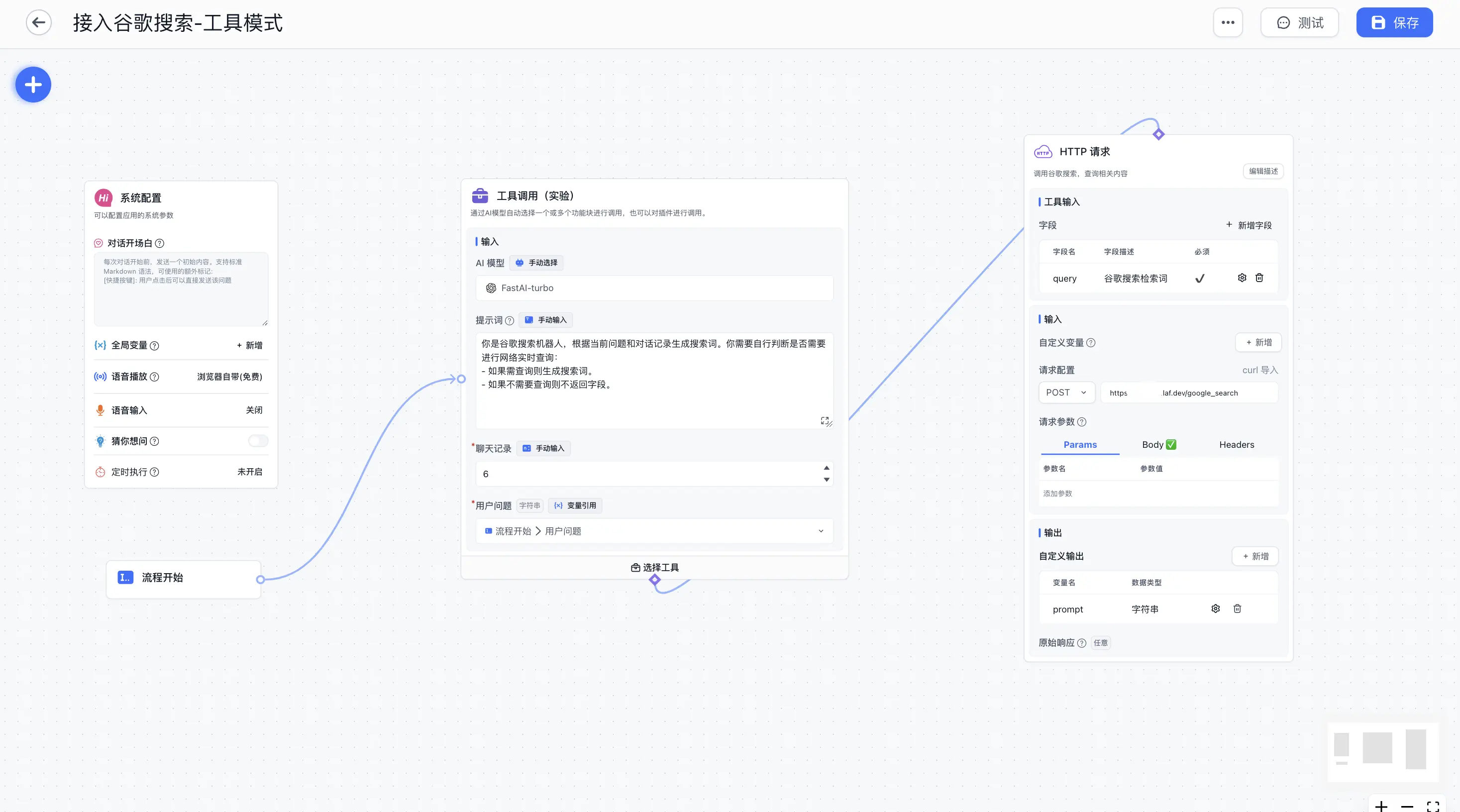 | Tool Call Mode 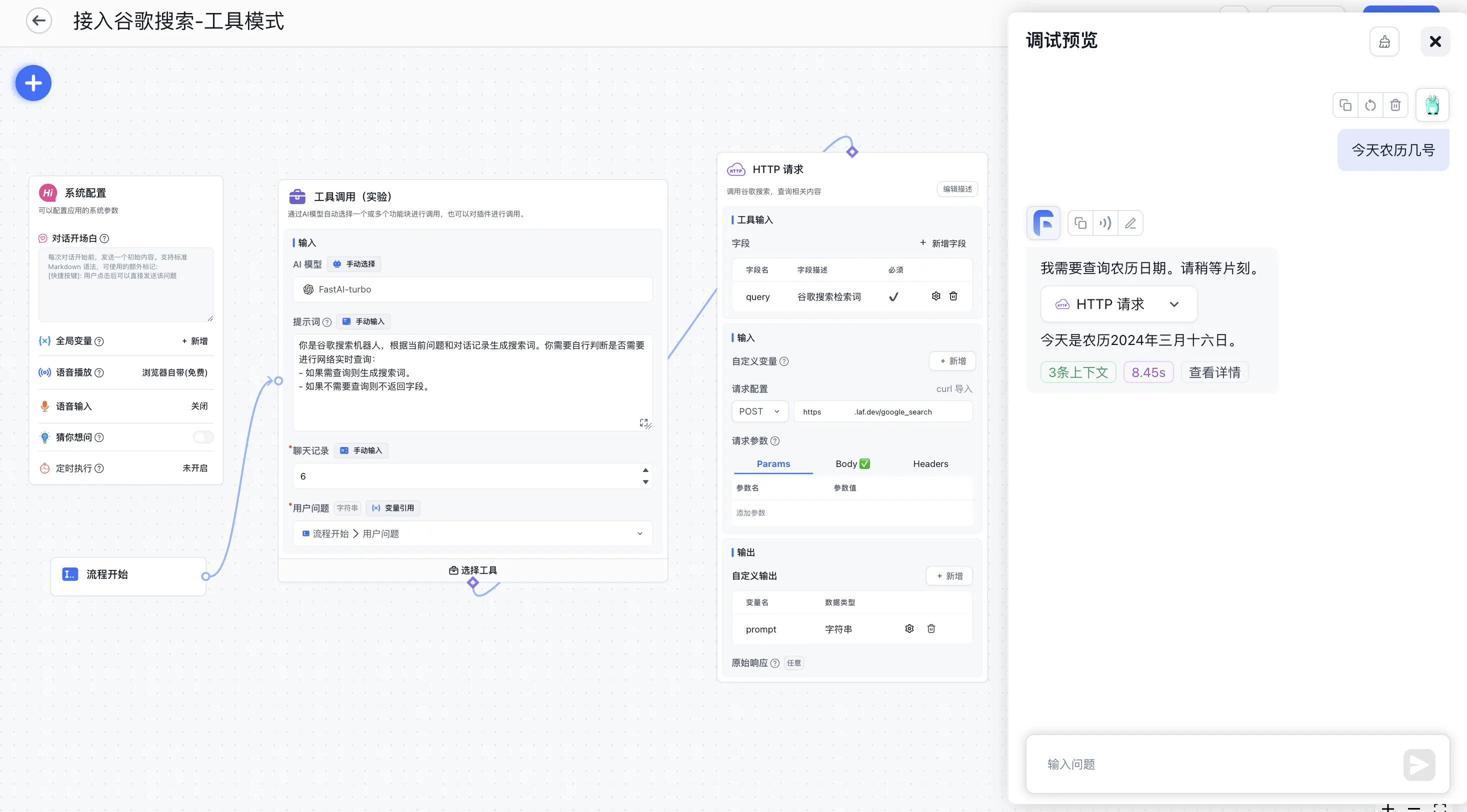 |
Non-Tool Call Mode 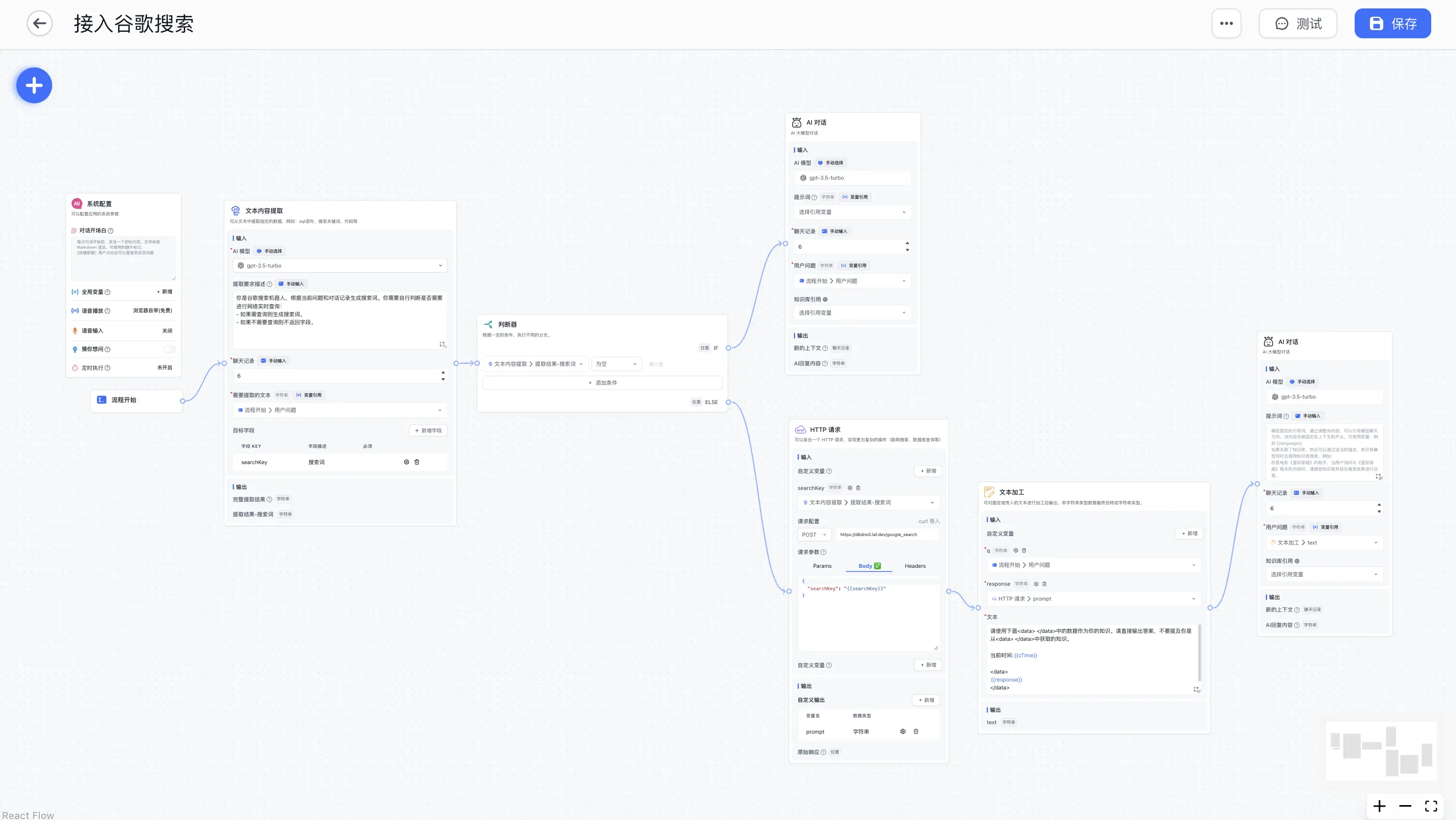 | Non-Tool Call Mode 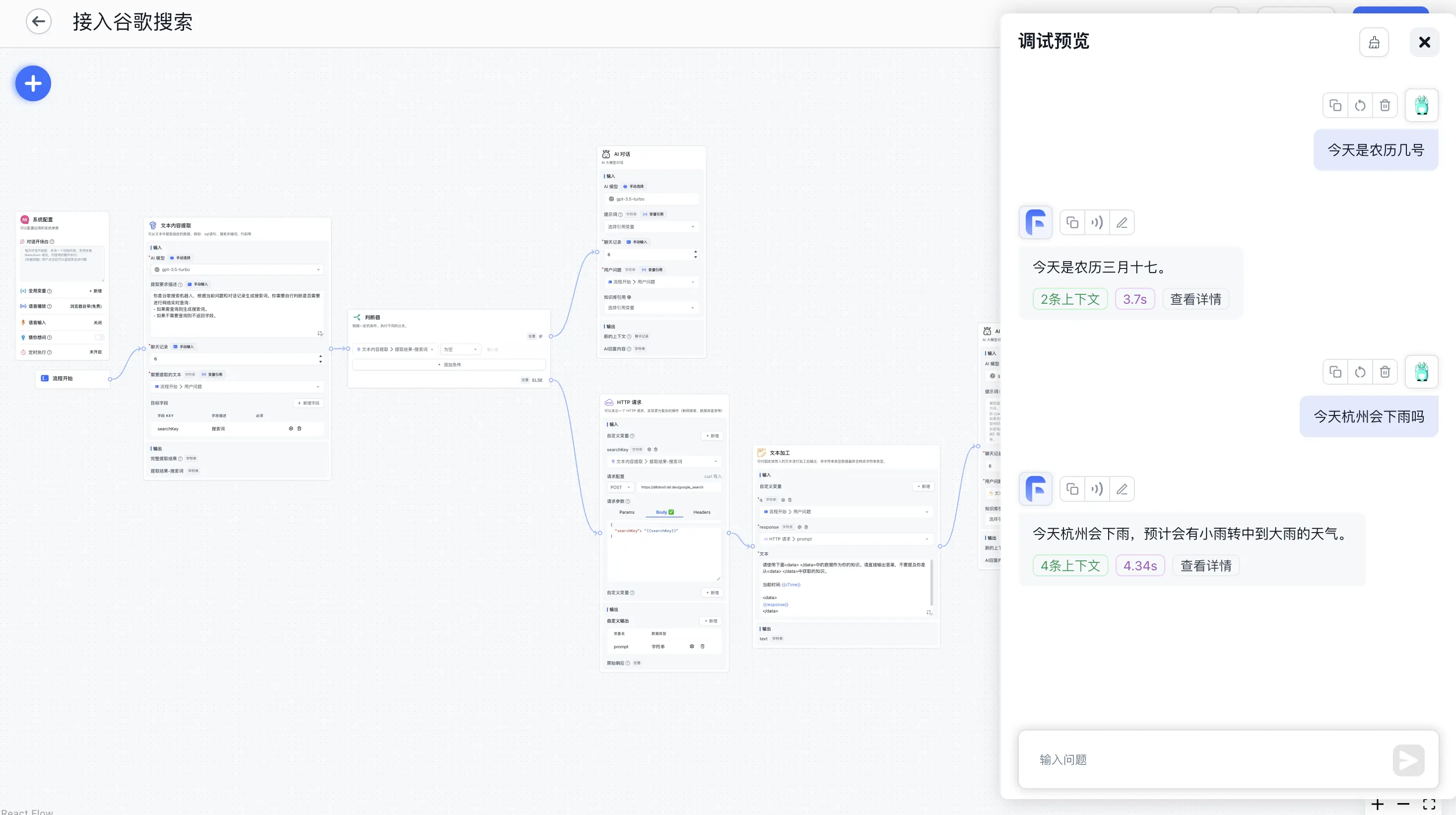 |
As shown above, using the「HTTP Request」module, you can connect an external search engine as reference material for AI responses. This example uses the Google Search API. Note: This article mainly introduces the「HTTP Request」module. The actual search effectiveness depends on prompts and the search engine, especially the【search engine】—simple search engines cannot retrieve detailed content, which may require more debugging.
Register Google Search API
Refer to this article, which allows 100 free uses per day.
Write a Google Search Interface
Use Laf to quickly implement an interface—write and publish instantly without deployment. Make sure to enable POST request method.
Laf Google Search Demo
import cloud from '@lafjs/cloud'

const googleSearchKey = "xxx"
const googleCxId = "3740cxxx"
const baseurl = "https://www.googleapis.com/customsearch/v1"

type RequestType = {
  searchKey: string
}

export default async function (ctx: FunctionContext) {
  const { searchKey } = ctx.body as RequestType
  console.log(ctx.body)
  if (!searchKey) {
    return {
      prompt: ""
    }
  }

  try {
    const { data } = await cloud.fetch.get(baseurl, {
      params: {
        q: searchKey,
        cx: googleCxId,
        key: googleSearchKey,
        c2coff: 1,
        start: 1,
        end: 20,
        dateRestrict: 'm[1]',
      }
    })
    const result = data.items.map((item) => item.snippet).join('\n');

    return { prompt: result }
  } catch (err) {
    console.log(err)
    ctx.response.status(500)
    return {
      message: "Error"
    }
  }
}
Workflow Design - Tool Call Mode
Using the tool module, no extra operations are needed—the model decides whether to call Google Search and generates search terms automatically.
Copy the configuration below, enter「Advanced Workflow」, select「Import Configuration」from the "..." in the top right corner, then modify the「HTTP Request」module - Request URL value after importing.
Workflow Configuration
{
  "nodes": [
    {
      "nodeId": "userGuide",
      "name": "System Configuration",
      "intro": "Configure application system parameters",
      "avatar": "/imgs/workflow/userGuide.png",
      "flowNodeType": "userGuide",
      "position": {
        "x": 262.2732338817093,
        "y": -476.00241136598146
      },
      "inputs": [
        {
          "key": "welcomeText",
          "renderTypeList": [
            "hidden"
          ],
          "valueType": "string",
          "label": "core.app.Welcome Text",
          "value": ""
        },
        {
          "key": "variables",
          "renderTypeList": [
            "hidden"
          ],
          "valueType": "any",
          "label": "core.app.Chat Variable",
          "value": []
        },
        {
          "key": "questionGuide",
          "valueType": "boolean",
          "renderTypeList": [
            "hidden"
          ],
          "label": "core.app.Question Guide",
          "value": false
        },
        {
          "key": "tts",
          "renderTypeList": [
            "hidden"
          ],
          "valueType": "any",
          "label": "",
          "value": {
            "type": "web"
          }
        },
        {
          "key": "whisper",
          "renderTypeList": [
            "hidden"
          ],
          "valueType": "any",
          "label": "",
          "value": {
            "open": false,
            "autoSend": false,
            "autoTTSResponse": false
          }
        },
        {
          "key": "scheduleTrigger",
          "renderTypeList": [
            "hidden"
          ],
          "valueType": "any",
          "label": "",
          "value": null
        }
      ],
      "outputs": []
    },
    {
      "nodeId": "448745",
      "name": "Workflow Start",
      "intro": "",
      "avatar": "/imgs/workflow/userChatInput.svg",
      "flowNodeType": "workflowStart",
      "position": {
        "x": 295.8944548701009,
        "y": 110.81336038514848
      },
      "inputs": [
        {
          "key": "userChatInput",
          "renderTypeList": [
            "reference",
            "textarea"
          ],
          "valueType": "string",
          "label": "User Question",
          "required": true,
          "toolDescription": "User Question"
        }
      ],
      "outputs": [
        {
          "id": "userChatInput",
          "key": "userChatInput",
          "label": "core.module.input.label.user question",
          "valueType": "string",
          "type": "static"
        }
      ]
    },
    {
      "nodeId": "NOgbnBzUwDgT",
      "name": "Tool Call",
      "intro": "Automatically select one or more function blocks to call through AI model, can also call plugins.",
      "avatar": "/imgs/workflow/tool.svg",
      "flowNodeType": "tools",
      "showStatus": true,
      "position": {
        "x": 1028.8358722416106,
        "y": -500.8755882990822
      },
      "inputs": [
        {
          "key": "model",
          "renderTypeList": [
            "settingLLMModel",
            "reference"
          ],
          "label": "core.module.input.label.aiModel",
          "valueType": "string",
          "value": "FastAI-plus"
        },
        {
          "key": "temperature",
          "renderTypeList": [
            "hidden"
          ],
          "label": "",
          "value": 0,
          "valueType": "number",
          "min": 0,
          "max": 10,
          "step": 1
        },
        {
          "key": "maxToken",
          "renderTypeList": [
            "hidden"
          ],
          "label": "",
          "value": 2000,
          "valueType": "number",
          "min": 100,
          "max": 4000,
          "step": 50
        },
        {
          "key": "systemPrompt",
          "renderTypeList": [
            "textarea",
            "reference"
          ],
          "max": 3000,
          "valueType": "string",
          "label": "core.ai.Prompt",
          "description": "core.app.tip.chatNodeSystemPromptTip",
          "placeholder": "core.app.tip.chatNodeSystemPromptTip",
          "value": "You are a Google search bot. Generate search terms based on the current question and conversation history. You need to determine whether real-time web queries are needed:\n- If a query is needed, generate search terms.\n- If no query is needed, don't return the field."
        },
        {
          "key": "history",
          "renderTypeList": [
            "numberInput",
            "reference"
          ],
          "valueType": "chatHistory",
          "label": "core.module.input.label.chat history",
          "required": true,
          "min": 0,
          "max": 30,
          "value": 6
        },
        {
          "key": "userChatInput",
          "renderTypeList": [
            "reference",
            "textarea"
          ],
          "valueType": "string",
          "label": "User Question",
          "required": true,
          "value": [
            "448745",
            "userChatInput"
          ]
        }
      ],
      "outputs": []
    },
    {
      "nodeId": "GMELVPxHfpg5",
      "name": "HTTP Request",
      "intro": "Call Google Search to query relevant content",
      "avatar": "/imgs/workflow/http.png",
      "flowNodeType": "httpRequest468",
      "showStatus": true,
      "position": {
        "x": 1013.2159795348916,
        "y": 210.8685573380423
      },
      "inputs": [
        {
          "key": "system_addInputParam",
          "renderTypeList": [
            "addInputParam"
          ],
          "valueType": "dynamic",
          "label": "",
          "required": false,
          "description": "core.module.input.description.HTTP Dynamic Input",
          "editField": {
            "key": true,
            "valueType": true
          }
        },
        {
          "valueType": "string",
          "renderTypeList": [
            "reference"
          ],
          "key": "query",
          "label": "query",
          "toolDescription": "Google search query term",
          "required": true,
          "canEdit": true,
          "editField": {
            "key": true,
            "description": true
          }
        },
        {
          "key": "system_httpMethod",
          "renderTypeList": [
            "custom"
          ],
          "valueType": "string",
          "label": "",
          "value": "POST",
          "required": true
        },
        {
          "key": "system_httpReqUrl",
          "renderTypeList": [
            "hidden"
          ],
          "valueType": "string",
          "label": "",
          "description": "core.module.input.description.Http Request Url",
          "placeholder": "https://api.ai.com/getInventory",
          "required": false,
          "value": "https://xxxxxx.laf.dev/google_search"
        },
        {
          "key": "system_httpHeader",
          "renderTypeList": [
            "custom"
          ],
          "valueType": "any",
          "value": [],
          "label": "",
          "description": "core.module.input.description.Http Request Header",
          "placeholder": "core.module.input.description.Http Request Header",
          "required": false
        },
        {
          "key": "system_httpParams",
          "renderTypeList": [
            "hidden"
          ],
          "valueType": "any",
          "value": [],
          "label": "",
          "required": false
        },
        {
          "key": "system_httpJsonBody",
          "renderTypeList": [
            "hidden"
          ],
          "valueType": "any",
          "value": "{\n  \"searchKey\": \"{{query}}\"\n}",
          "label": "",
          "required": false
        }
      ],
      "outputs": [
        {
          "id": "system_addOutputParam",
          "key": "system_addOutputParam",
          "type": "dynamic",
          "valueType": "dynamic",
          "label": "",
          "editField": {
            "key": true,
            "valueType": true
          }
        },
        {
          "id": "httpRawResponse",
          "key": "httpRawResponse",
          "label": "Raw Response",
          "description": "Raw response from HTTP request. Only accepts string or JSON type response data.",
          "valueType": "any",
          "type": "static"
        },
        {
          "id": "M5YmxaYe8em1",
          "type": "dynamic",
          "key": "prompt",
          "valueType": "string",
          "label": "prompt"
        }
      ]
    }
  ],
  "edges": [
    {
      "source": "448745",
      "target": "NOgbnBzUwDgT",
      "sourceHandle": "448745-source-right",
      "targetHandle": "NOgbnBzUwDgT-target-left"
    },
    {
      "source": "NOgbnBzUwDgT",
      "target": "GMELVPxHfpg5",
      "sourceHandle": "selectedTools",
      "targetHandle": "selectedTools"
    }
  ]
}
Workflow Design - Non-Tool Call Mode
Copy the configuration below, enter「Advanced Workflow」, select「Import Configuration」from the "..." in the top right corner, then modify the「HTTP Request」module - Request URL value after importing.
Workflow Configuration
[Configuration JSON omitted for brevity - same structure as Chinese version with translated labels]Workflow Explanation
- Use the【Content Extraction】module to extract search keywords from the user's question.
- Pass the search keywords to the【HTTP Request】module to execute Google Search.
- Use the【Text Processing】module to combine search results and the question, generating a question suitable for the model to answer.
- Send the new question to the【AI Chat】module to answer based on search results.
File Updated