
Send Lark Webhook Notifications
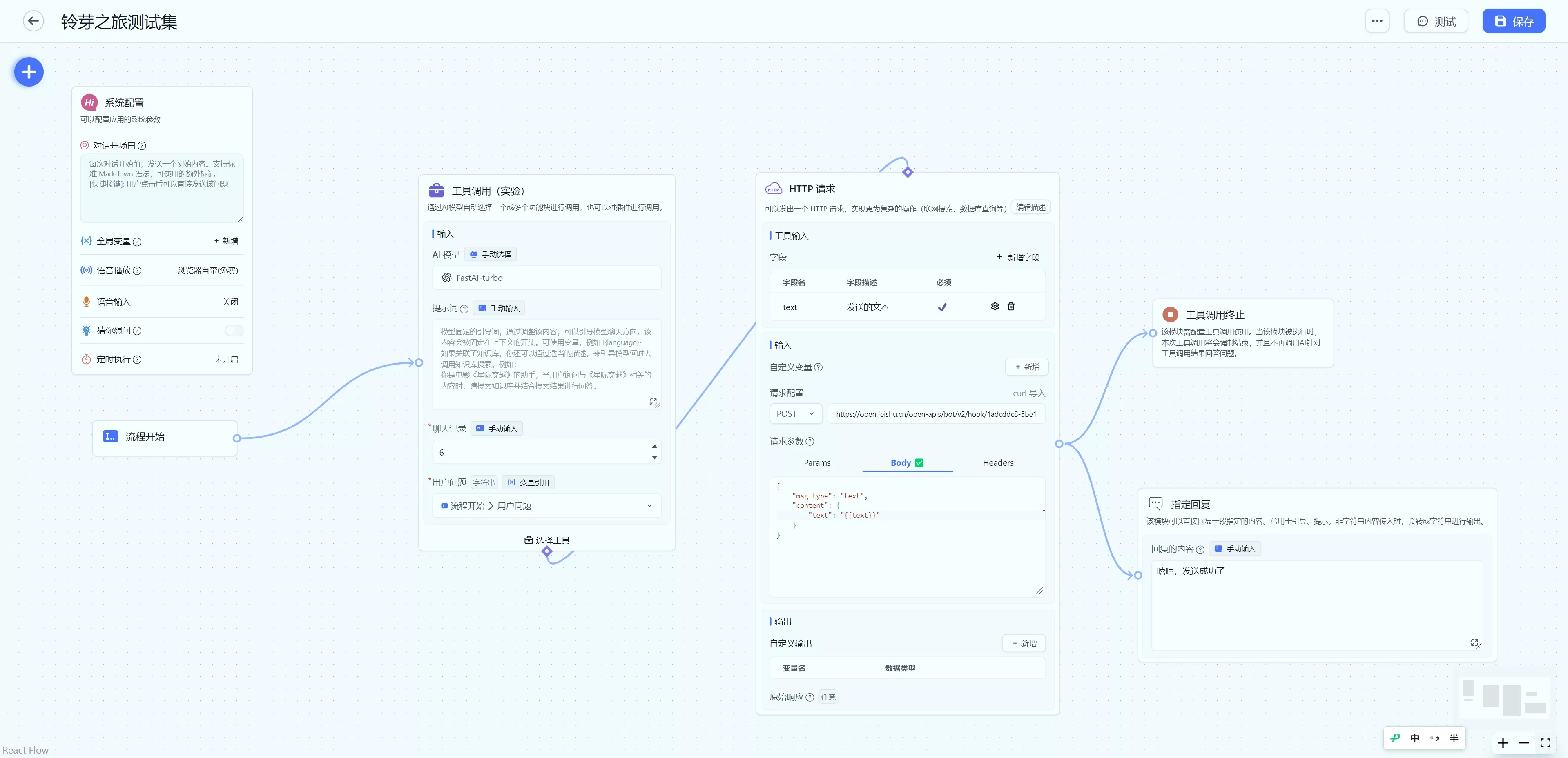
Use the Tool Call module to send Lark webhook notifications
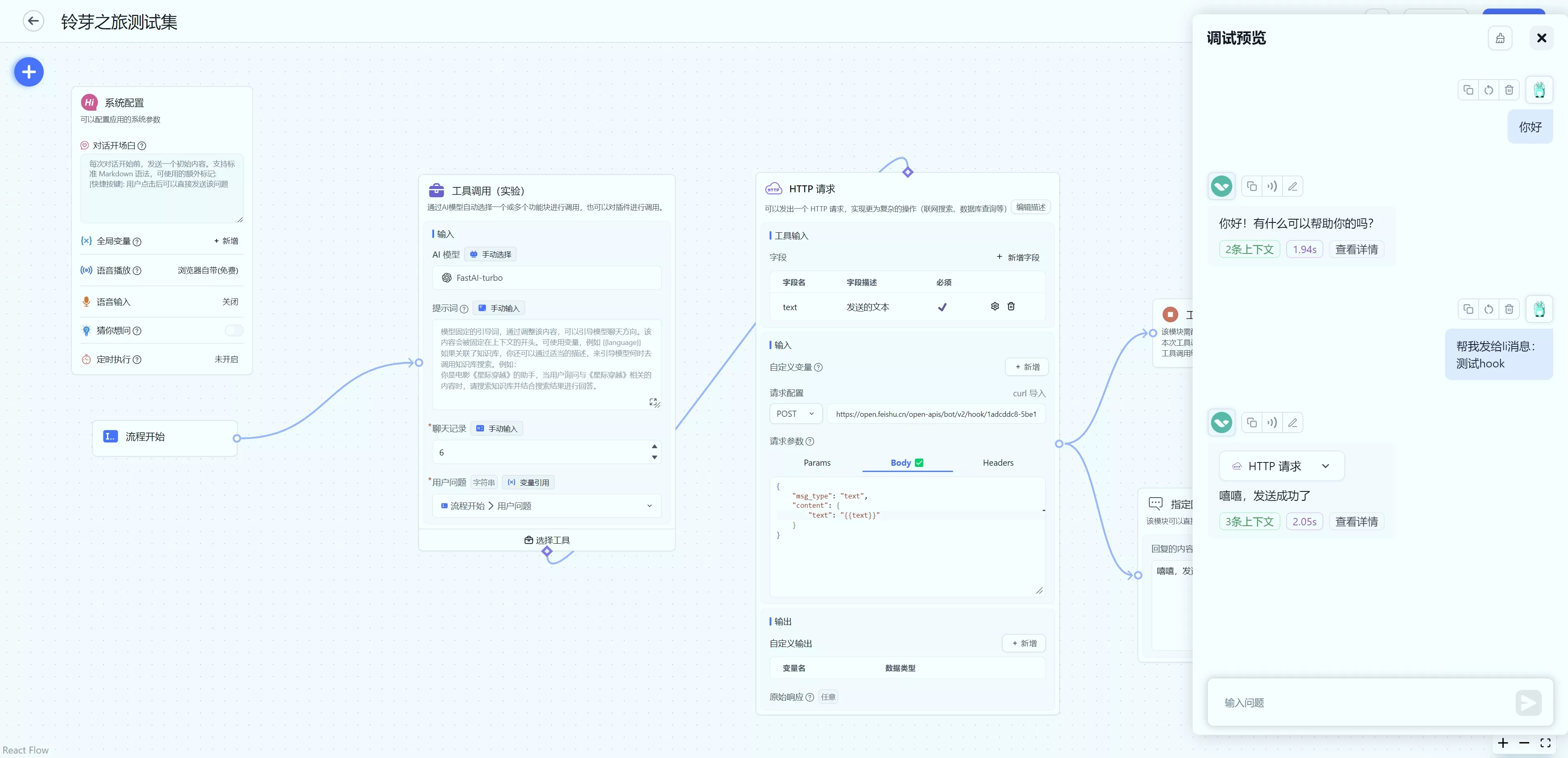
This article shows how to send a simple Lark webhook notification. The same approach applies to other types of notifications.
 |  |
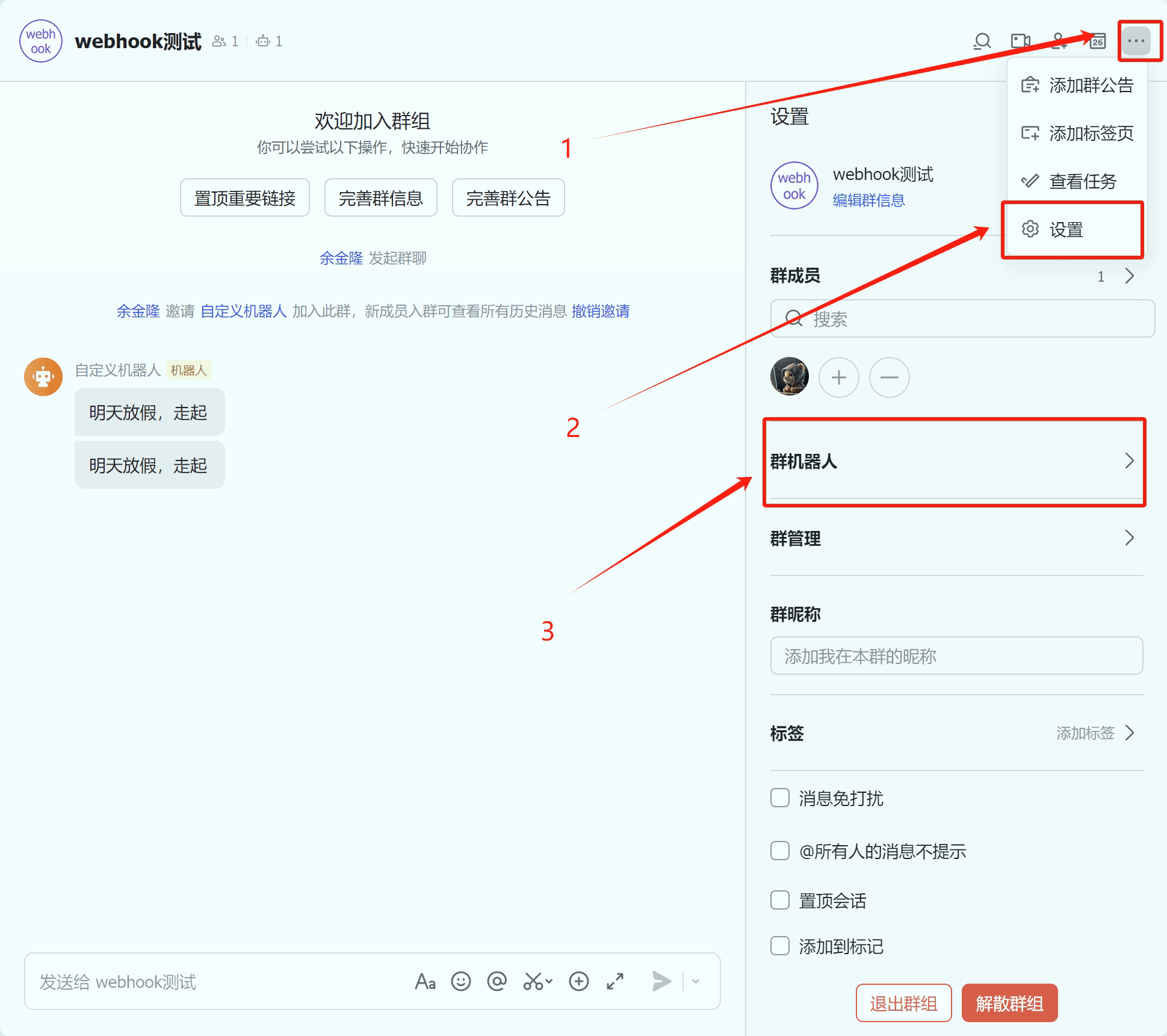
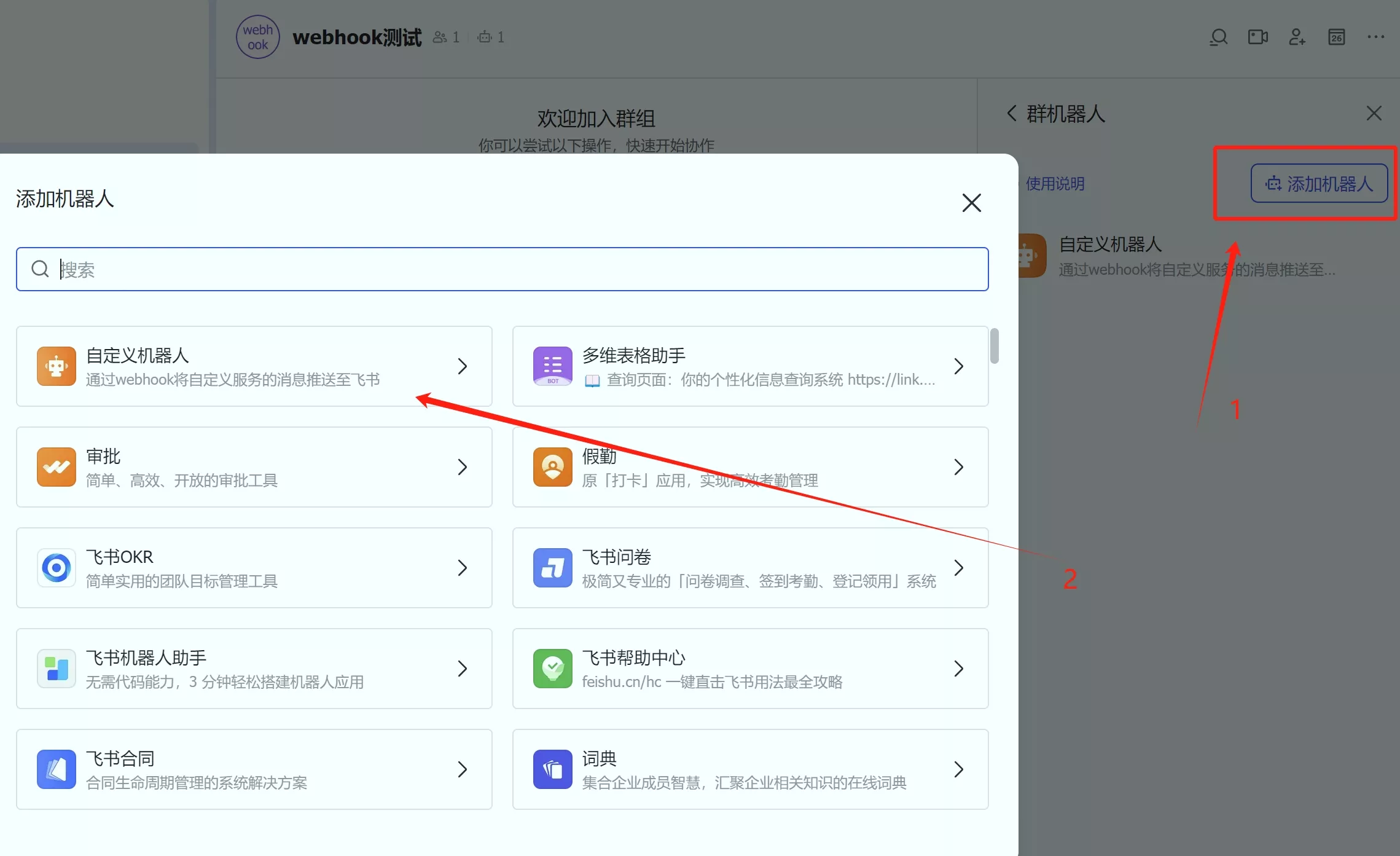
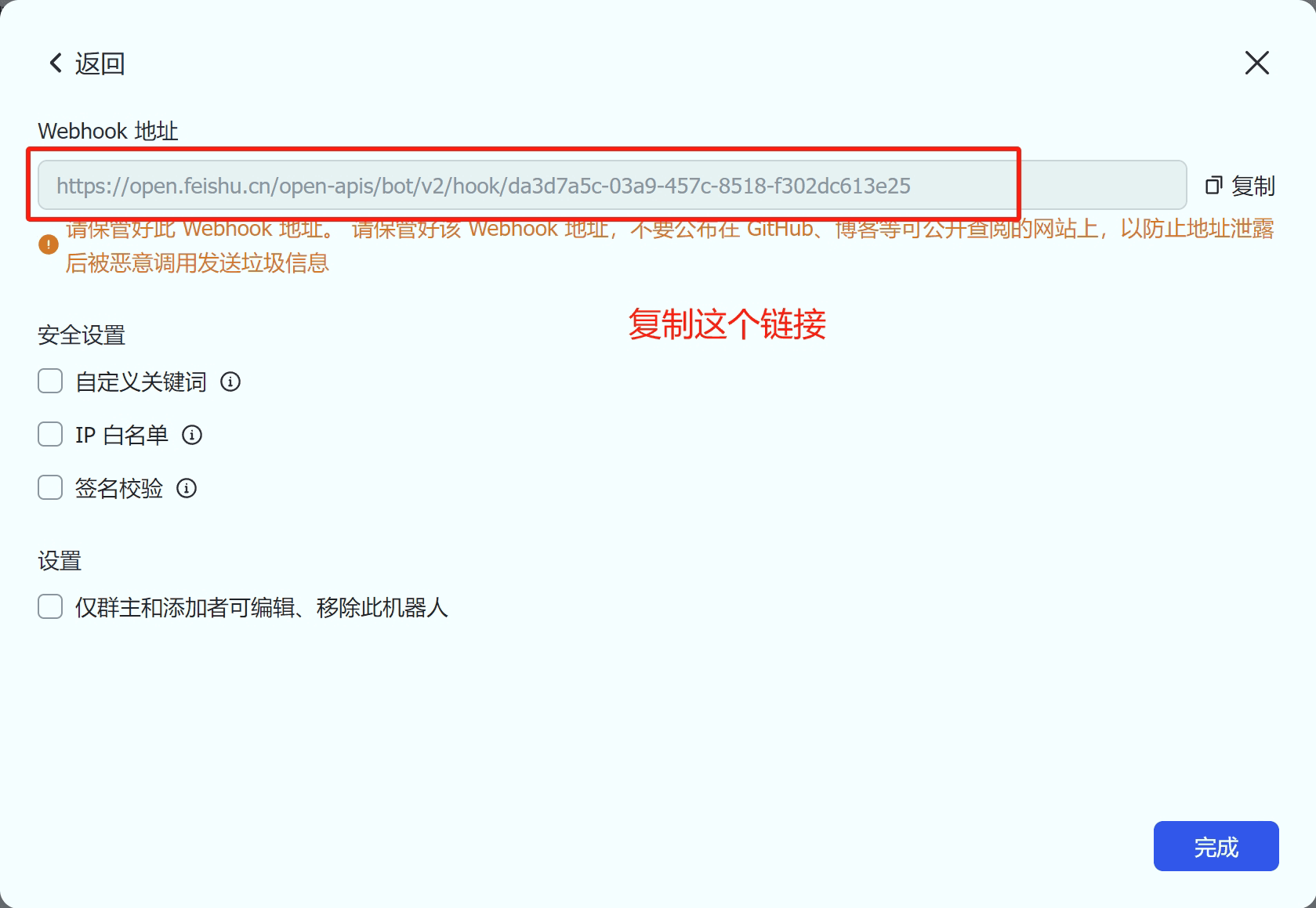
1. Set Up the Lark Bot
 |  |  |
2. Import Workflow Configuration
Copy the configuration below, click the import button in the top-right corner of "Advanced Orchestration", and import it. After importing, paste the webhook URL provided by Lark into the "HTTP Request" module.
Workflow Configuration
{
  "nodes": [
    {
      "nodeId": "userGuide",
      "name": "系统配置",
      "intro": "可以配置应用的系统参数",
      "avatar": "/imgs/workflow/userGuide.png",
      "flowNodeType": "userGuide",
      "position": {
        "x": 303.41163758039283,
        "y": -552.297639861266
      },
      "version": "481",
      "inputs": [],
      "outputs": []
    },
    {
      "nodeId": "workflowStartNodeId",
      "name": "流程开始",
      "intro": "",
      "avatar": "/imgs/workflow/userChatInput.svg",
      "flowNodeType": "workflowStart",
      "position": {
        "x": 529.3935295017156,
        "y": 197.114018410347
      },
      "version": "481",
      "inputs": [
        {
          "key": "userChatInput",
          "renderTypeList": [
            "reference",
            "textarea"
          ],
          "valueType": "string",
          "label": "用户问题",
          "required": true,
          "toolDescription": "用户问题"
        }
      ],
      "outputs": [
        {
          "id": "userChatInput",
          "key": "userChatInput",
          "label": "core.module.input.label.user question",
          "valueType": "string",
          "type": "static"
        }
      ]
    },
    {
      "nodeId": "u6IAOEssxoZT",
      "name": "工具调用",
      "intro": "通过AI模型自动选择一个或多个功能块进行调用,也可以对插件进行调用。",
      "avatar": "/imgs/workflow/tool.svg",
      "flowNodeType": "tools",
      "showStatus": true,
      "position": {
        "x": 1003.146243538873,
        "y": 48.52327869406625
      },
      "version": "481",
      "inputs": [
        {
          "key": "model",
          "renderTypeList": [
            "settingLLMModel",
            "reference"
          ],
          "label": "core.module.input.label.aiModel",
          "valueType": "string",
          "value": "gpt-3.5-turbo"
        },
        {
          "key": "temperature",
          "renderTypeList": [
            "hidden"
          ],
          "label": "",
          "value": 0,
          "valueType": "number",
          "min": 0,
          "max": 10,
          "step": 1
        },
        {
          "key": "maxToken",
          "renderTypeList": [
            "hidden"
          ],
          "label": "",
          "value": 2000,
          "valueType": "number",
          "min": 100,
          "max": 4000,
          "step": 50
        },
        {
          "key": "systemPrompt",
          "renderTypeList": [
            "textarea",
            "reference"
          ],
          "max": 3000,
          "valueType": "string",
          "label": "core.ai.Prompt",
          "description": "core.app.tip.chatNodeSystemPromptTip",
          "placeholder": "core.app.tip.chatNodeSystemPromptTip"
        },
        {
          "key": "history",
          "renderTypeList": [
            "numberInput",
            "reference"
          ],
          "valueType": "chatHistory",
          "label": "core.module.input.label.chat history",
          "description": "最多携带多少轮对话记录",
          "required": true,
          "min": 0,
          "max": 50,
          "value": 6
        },
        {
          "key": "userChatInput",
          "renderTypeList": [
            "reference",
            "textarea"
          ],
          "valueType": "string",
          "label": "用户问题",
          "required": true,
          "value": [
            "workflowStartNodeId",
            "userChatInput"
          ]
        }
      ],
      "outputs": [
        {
          "id": "answerText",
          "key": "answerText",
          "label": "core.module.output.label.Ai response content",
          "description": "core.module.output.description.Ai response content",
          "valueType": "string",
          "type": "static"
        }
      ]
    },
    {
      "nodeId": "fvY5hb0K646V",
      "name": "工具调用终止",
      "intro": "该模块需配置工具调用使用。当该模块被执行时,本次工具调用将会强制结束,并且不再调用AI针对工具调用结果回答问题。",
      "avatar": "/imgs/workflow/toolStop.svg",
      "flowNodeType": "stopTool",
      "position": {
        "x": 2367.838362362707,
        "y": 732.355988936165
      },
      "version": "481",
      "inputs": [],
      "outputs": []
    },
    {
      "nodeId": "x9rN2a4WnZmt",
      "name": "HTTP 请求",
      "intro": "向飞书发送一个webhooks通知信息。",
      "avatar": "/imgs/workflow/http.png",
      "flowNodeType": "httpRequest468",
      "showStatus": true,
      "position": {
        "x": 1623.9214305901633,
        "y": 22.777089001645862
      },
      "version": "486",
      "inputs": [
        {
          "key": "system_addInputParam",
          "renderTypeList": [
            "addInputParam"
          ],
          "valueType": "dynamic",
          "label": "",
          "required": false,
          "description": "core.module.input.description.HTTP Dynamic Input",
          "editField": {
            "key": true,
            "valueType": true
          }
        },
        {
          "valueType": "string",
          "renderTypeList": [
            "reference"
          ],
          "key": "text",
          "label": "text",
          "toolDescription": "发送的消息",
          "required": true,
          "canEdit": true,
          "editField": {
            "key": true,
            "description": true
          }
        },
        {
          "key": "system_httpMethod",
          "renderTypeList": [
            "custom"
          ],
          "valueType": "string",
          "label": "",
          "value": "POST",
          "required": true
        },
        {
          "key": "system_httpReqUrl",
          "renderTypeList": [
            "hidden"
          ],
          "valueType": "string",
          "label": "",
          "description": "core.module.input.description.Http Request Url",
          "placeholder": "https://api.ai.com/getInventory",
          "required": false,
          "value": ""
        },
        {
          "key": "system_httpHeader",
          "renderTypeList": [
            "custom"
          ],
          "valueType": "any",
          "value": [],
          "label": "",
          "description": "core.module.input.description.Http Request Header",
          "placeholder": "core.module.input.description.Http Request Header",
          "required": false
        },
        {
          "key": "system_httpParams",
          "renderTypeList": [
            "hidden"
          ],
          "valueType": "any",
          "value": [],
          "label": "",
          "required": false
        },
        {
          "key": "system_httpJsonBody",
          "renderTypeList": [
            "hidden"
          ],
          "valueType": "any",
          "value": "{\r\n    \"msg_type\": \"text\",\r\n    \"content\": {\r\n        \"text\": \"{{text}}\"\r\n    }\r\n}",
          "label": "",
          "required": false
        }
      ],
      "outputs": [
        {
          "id": "system_addOutputParam",
          "key": "system_addOutputParam",
          "type": "dynamic",
          "valueType": "dynamic",
          "label": "",
          "editField": {
            "key": true,
            "valueType": true
          }
        },
        {
          "id": "error",
          "key": "error",
          "label": "请求错误",
          "description": "HTTP请求错误信息,成功时返回空",
          "valueType": "object",
          "type": "static"
        },
        {
          "id": "httpRawResponse",
          "key": "httpRawResponse",
          "label": "原始响应",
          "required": true,
          "description": "HTTP请求的原始响应。只能接受字符串或JSON类型响应数据。",
          "valueType": "any",
          "type": "static"
        }
      ]
    },
    {
      "nodeId": "aGHGqH2oUupj",
      "name": "指定回复",
      "intro": "该模块可以直接回复一段指定的内容。常用于引导、提示。非字符串内容传入时,会转成字符串进行输出。",
      "avatar": "/imgs/workflow/reply.png",
      "flowNodeType": "answerNode",
      "position": {
        "x": 2350.7077940158674,
        "y": 107.32448732713493
      },
      "version": "481",
      "inputs": [
        {
          "key": "text",
          "renderTypeList": [
            "textarea",
            "reference"
          ],
          "valueType": "any",
          "required": true,
          "label": "core.module.input.label.Response content",
          "description": "core.module.input.description.Response content",
          "placeholder": "core.module.input.description.Response content",
          "value": "嘻嘻,发送成功"
        }
      ],
      "outputs": []
    }
  ],
  "edges": [
    {
      "source": "workflowStartNodeId",
      "target": "u6IAOEssxoZT",
      "sourceHandle": "workflowStartNodeId-source-right",
      "targetHandle": "u6IAOEssxoZT-target-left"
    },
    {
      "source": "u6IAOEssxoZT",
      "target": "x9rN2a4WnZmt",
      "sourceHandle": "selectedTools",
      "targetHandle": "selectedTools"
    },
    {
      "source": "x9rN2a4WnZmt",
      "target": "fvY5hb0K646V",
      "sourceHandle": "x9rN2a4WnZmt-source-right",
      "targetHandle": "fvY5hb0K646V-target-left"
    },
    {
      "source": "x9rN2a4WnZmt",
      "target": "aGHGqH2oUupj",
      "sourceHandle": "x9rN2a4WnZmt-source-right",
      "targetHandle": "aGHGqH2oUupj-target-left"
    }
  ],
  "chatConfig": {
    "variables": [
      {
        "id": "txq1ca",
        "key": "test",
        "label": "测试",
        "type": "custom",
        "required": true,
        "maxLen": 50,
        "enums": [
          {
            "value": ""
          }
        ]
      }
    ],
    "questionGuide": false,
    "scheduledTriggerConfig": {
      "cronString": "",
      "timezone": "Asia/Shanghai",
      "defaultPrompt": ""
    },
    "_id": "66715d4bf577287d39e35ecf"
  }
}
3. How It Works
- Attach an HTTP module to the Tool Call with the description: "Call Lark webhook to send a notification."
- In the HTTP module's input parameters, fill in the Lark bot's webhook URL and the notification content.
- Connect the HTTP module's output to a Tool Call Terminator to force-end the tool call. Without this, the result would be sent back to the model, which would generate another response — wasting tokens.
- Also connect the HTTP module's output to a Specified Reply to directly return a success message, replacing the AI's response.
Edit on GitHub
File Updated