Integrating OXR PDF parsing
Deploy OXR with Docker to parse PDFs locally in FastGPT, with offline operation and multiple GPUs on one server
SoMark OXR-1.0 recognizes text, tables, formulas, and images in PDFs and converts them to Markdown. This guide uses a Docker image adapted for FastGPT with model weights included. Once you have the image, startup does not require downloading models. The image is public and can be pulled without signing in.
1. Requirements
- Linux x86_64 with Docker and the NVIDIA Container Toolkit installed.
- An NVIDIA Ampere or newer GPU with compute capability 8.0 or higher. Allow at least 16 GB of VRAM per GPU; 24 GB or more is recommended. Keep enough VRAM free for the service.
- An NVIDIA driver that supports CUDA 13.0. On Linux, use version 580.65.06 or newer. See the CUDA 13.0 driver requirements.
- For one GPU, 8 CPU cores, 32 GB of system RAM, and at least 50 GB of free space on the Docker data disk are recommended.
2. Start the service
Run this command on the GPU server:
docker run -d --name oxr \
  --restart unless-stopped \
  --gpus device=0 \
  --shm-size=8g --cpus=8 --memory=32g \
  -p 18080:8000 \
  -v oxr-cache:/cache \
  --log-opt max-size=20m --log-opt max-file=3 \
  crpi-h3snc261q1dosroc.cn-hangzhou.personal.cr.aliyuncs.com/fastgpt_ck/oxr:1.0.2-cu130
This command uses only GPU 0 and exposes port 18080. The oxr-cache volume stores compilation caches generated at startup. Container logs rotate automatically based on size.
--shm-size sets the shared memory limit. --cpus and --memory limit container CPU usage and system RAM. These are not GPU VRAM limits, and the container does not reserve all of these resources immediately.
Wait for model loading and warmup to finish. Use docker logs -f oxr to follow startup. The service is ready when this check returns "status":"healthy":
curl --fail http://127.0.0.1:18080/health3. Connect FastGPT
Add or update customPdfParse under systemEnv in your existing config.json. Replace GPU_SERVER_IP with a GPU server address reachable from the FastGPT server:
{
  "systemEnv": {
    "customPdfParse": {
      "url": "http://GPU_SERVER_IP:18080/v2/parse/file",
      "key": "",
      "price": 0
    }
  }
}
No API key is required by default, so leave key empty. Restart FastGPT after changing the configuration file.
In the commercial edition, go to Admin → System configuration → Basic configuration → PDF parsing settings. Enter the service URL in the Custom PDF parsing URL (first priority) field, leave the custom PDF parsing key empty by default, and click Save.
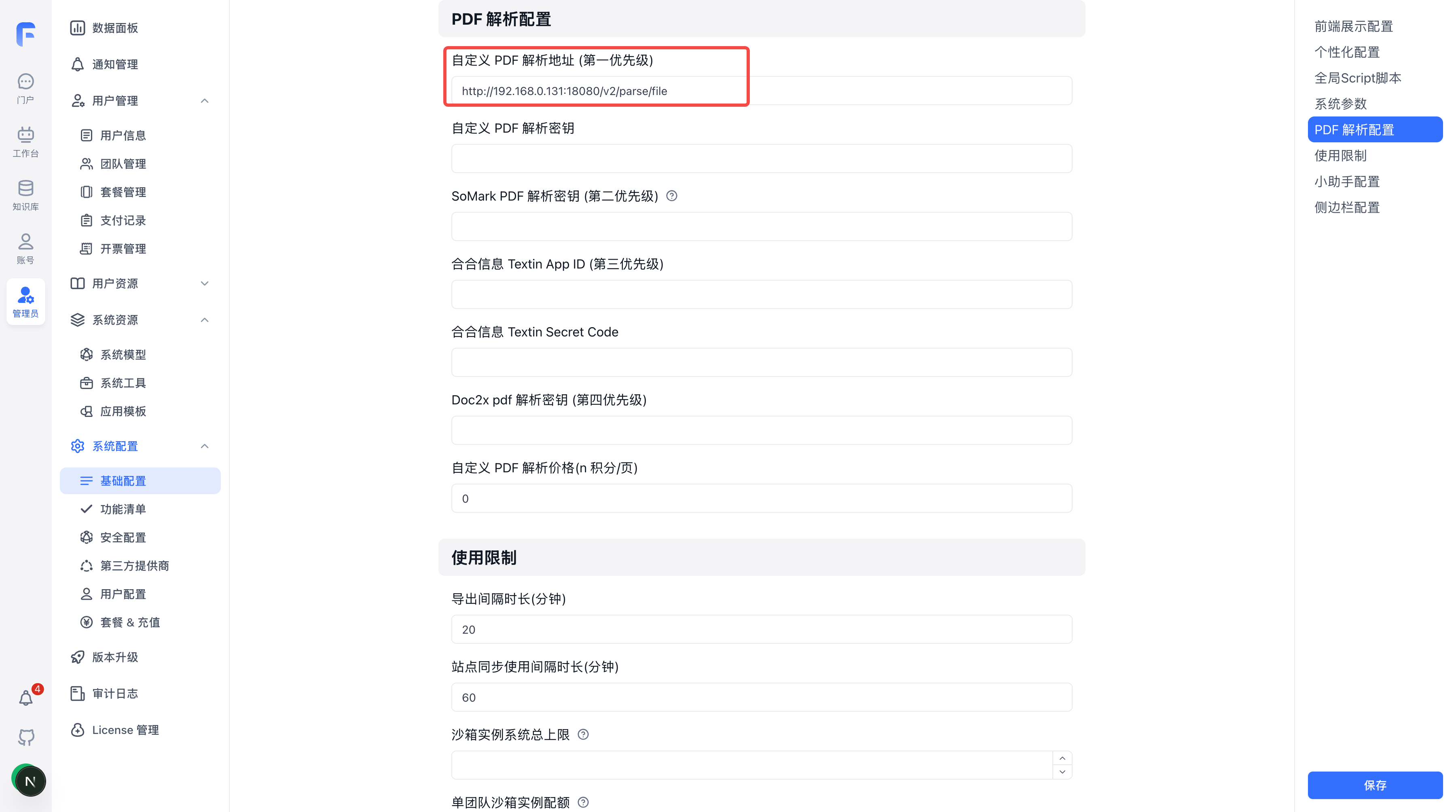
The screenshot uses an example IP address. Replace it with your GPU server address and keep the /v2/parse/file path.
If FastGPT runs in a separate container, use the GPU server's IP address or a service address reachable on the same Docker network instead of 127.0.0.1.
Enable Enhanced PDF Parsing when importing a PDF into a Dataset. You can also enable it in an app's file upload settings.
Test the API
Replace sample.pdf with a local PDF file:
curl --fail-with-body \
  -F 'file=@./sample.pdf' \
  http://GPU_SERVER_IP:18080/v2/parse/file
Response format:
{
  "pages": 2,
  "markdown": "# Parsed content\n\nText, tables, formulas and images."
}
pages is the page count, and markdown contains the parsed content. Extracted images are embedded in Markdown as base64 data, which FastGPT saves to its storage.
4. Concurrency and multiple GPUs (optional)
At startup, the service selects recognition concurrency based on the free VRAM on each GPU. By default, each GPU processes one document at a time.
| Parameter | Default | Description |
|---|---|---|
OXR_DOCUMENT_CONCURRENCY | 1 | Documents processed simultaneously per GPU; range: 1–4 |
OXR_RECOGNITION_CONCURRENCY | auto | Document regions recognized simultaneously per GPU; can be set manually to 1–32 |
FASTGPT_PARSE_TIMEOUT | 540 | Request timeout in seconds, including queue time |
OXR_MAX_UPLOAD_MB | 64 | Maximum upload request size in MiB |
FASTGPT_API_KEY | Unset | Optional; enables Bearer authentication when set |
OXR_LOG_LEVEL | INFO | Document processing log level; DEBUG includes internal access logs and model statistics |
OXR_PROGRESS_INTERVAL_SECONDS | 10 | Minimum interval between progress updates for long documents, in seconds; range: 1–300 |
For example, to process two documents per GPU with eight concurrent region recognition requests, add these options before the image address in docker run:
-e OXR_DOCUMENT_CONCURRENCY=2 \
-e OXR_RECOGNITION_CONCURRENCY=8
Higher concurrency does not always improve speed. If a manual setting exceeds the estimated VRAM budget, the service reports an error. Free up VRAM or lower concurrency.
Use multiple GPUs
To use GPUs 0 and 1, replace --gpus device=0 in the startup command with:
--gpus '"device=0,1"'Use --gpus all to make all GPUs visible to the container. Each GPU loads a complete model replica. The service distributes document requests through the same API address; VRAM is not pooled across GPUs.
Increase CPU, system RAM, and shared memory for multiple GPUs. For two GPUs, the recommended resource options are:
--shm-size=16g --cpus=16 --memory=64gRecreate the container after changing environment variables or GPU options. docker restart alone does not apply these changes.
Enable an API key
To enable authentication, add -e FASTGPT_API_KEY=your-api-key before the image address. Set customPdfParse.key in FastGPT to the same key. Direct API calls must include the Authorization: Bearer your-api-key header.
5. Offline deployment (optional)
On a machine with internet access, pull and export the image:
docker pull crpi-h3snc261q1dosroc.cn-hangzhou.personal.cr.aliyuncs.com/fastgpt_ck/oxr:1.0.2-cu130
docker save crpi-h3snc261q1dosroc.cn-hangzhou.personal.cr.aliyuncs.com/fastgpt_ck/oxr:1.0.2-cu130 | gzip -1 > oxr.tar.gz
Copy oxr.tar.gz to the offline server, import it, and follow step 2 to start the service:
gunzip -c oxr.tar.gz | docker load6. Logs and troubleshooting
Show the last 10 minutes of logs and follow new output:
docker logs --since 10m --tail 100 -f oxrThe default logs show queueing, GPU assignment, decoding, layout analysis, recognition, and results in concise English. Follow the same request_id across a request. Long documents produce progress summaries at most once every 10 seconds by default.
document.completed: OXR has finished parsing the document.request.completed: OXR has finished sending the API response. FastGPT still needs to chunk and index the content.document.failed: Parsing failed. Checkstage,reason, and elapsed time.
| Issue | What to check |
|---|---|
| Startup fails or VRAM is insufficient | Check free VRAM with nvidia-smi and review docker logs --tail 100 oxr. Free up VRAM or lower concurrency. |
| FastGPT cannot connect | Confirm the FastGPT server can reach port 18080, the URL includes /v2/parse/file, and the key matches the service configuration. |
| Large documents time out | Split the PDF first. If you extend the timeout, update FASTGPT_PARSE_TIMEOUT, FastGPT's PARSE_FILE_TIMEOUT_SECONDS, and the reverse proxy timeout together. |
7. Parsing examples
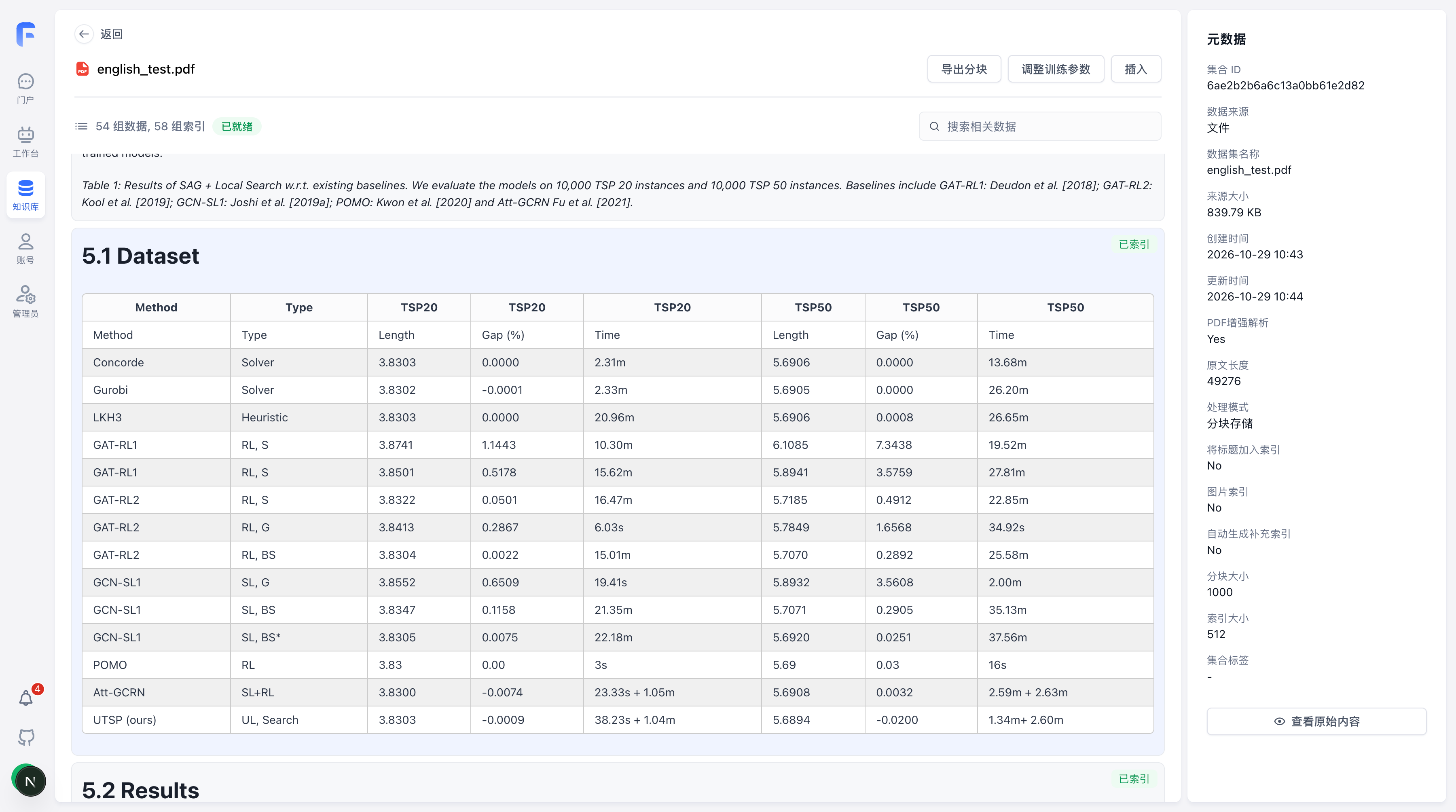
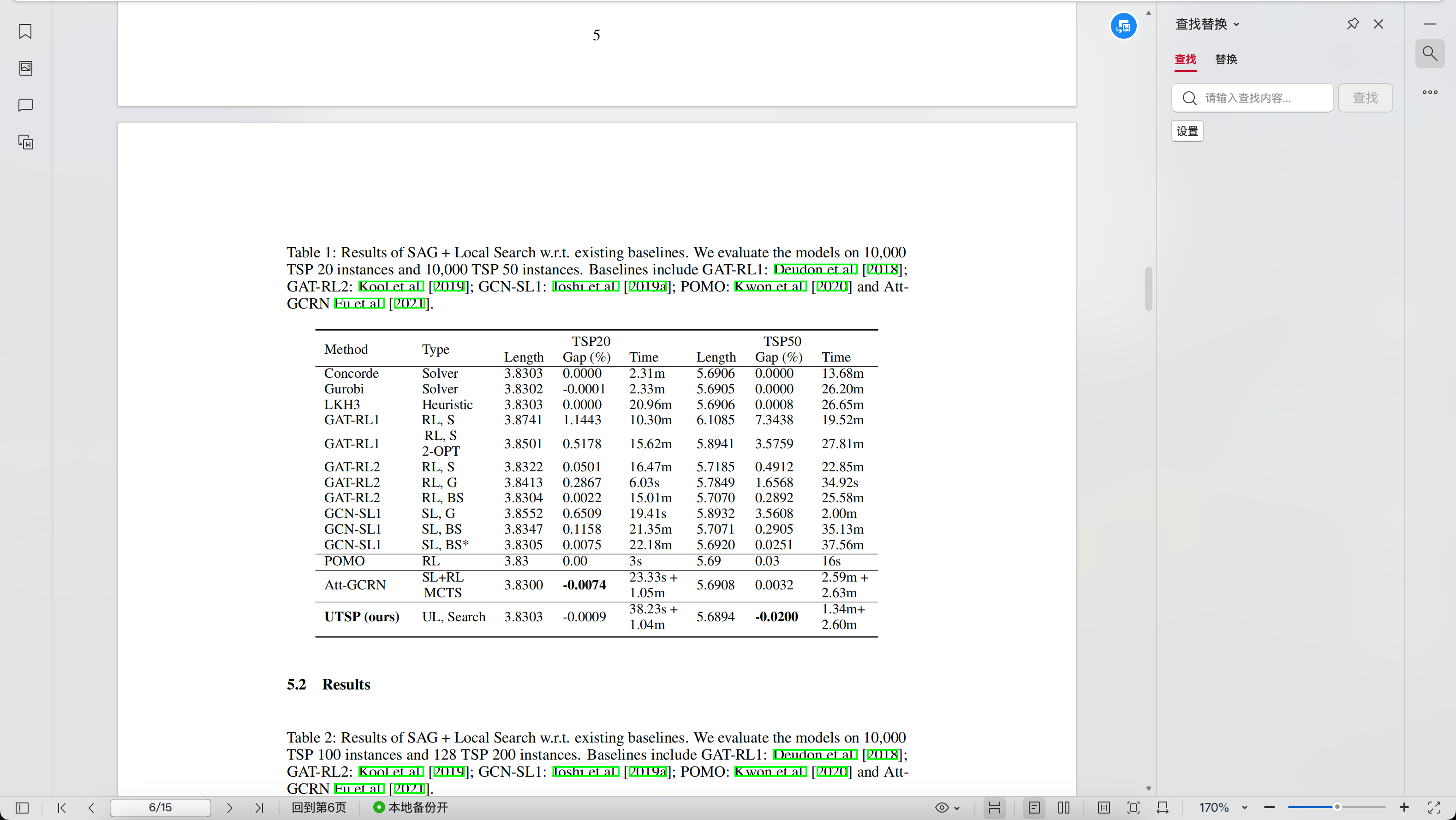
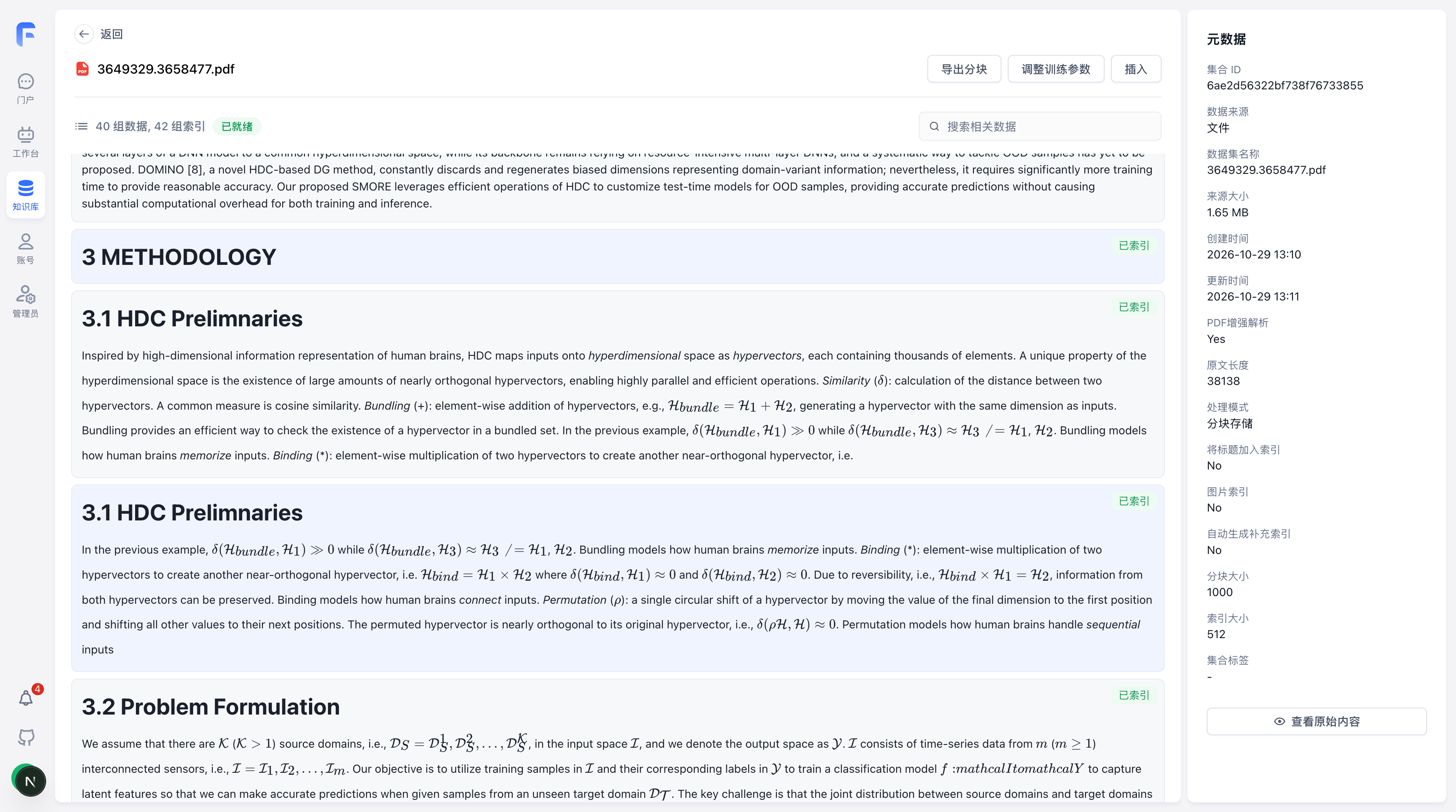
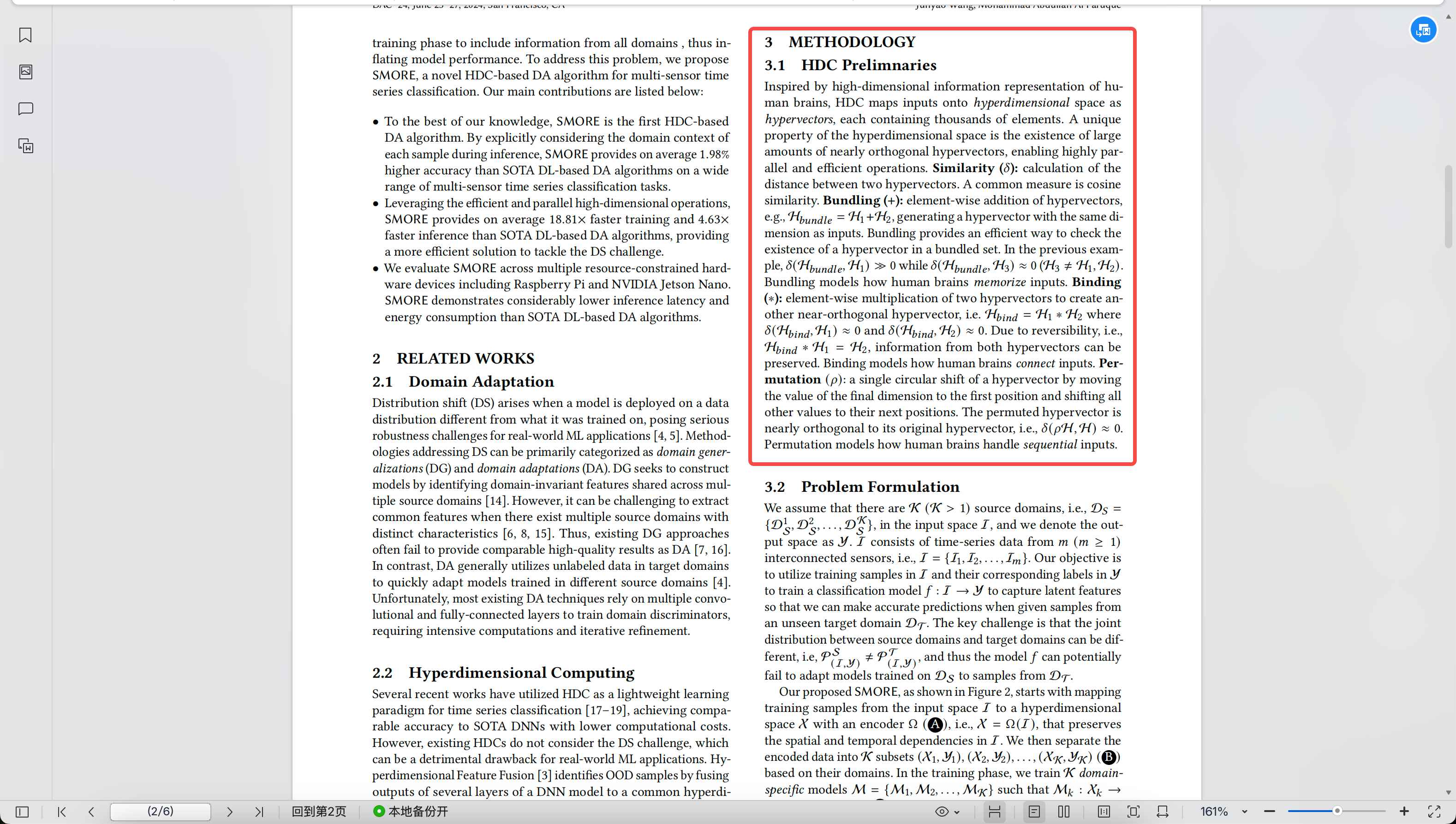
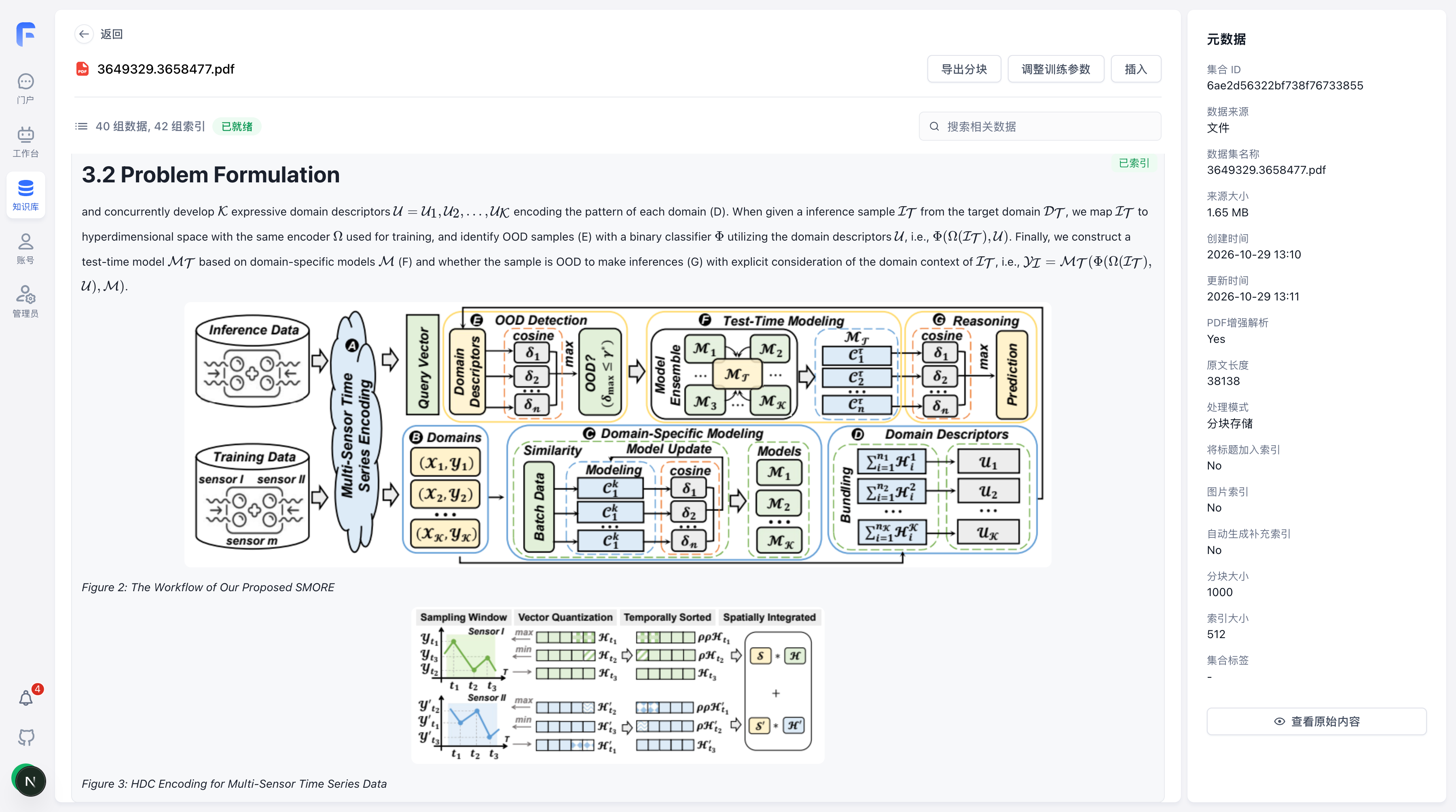
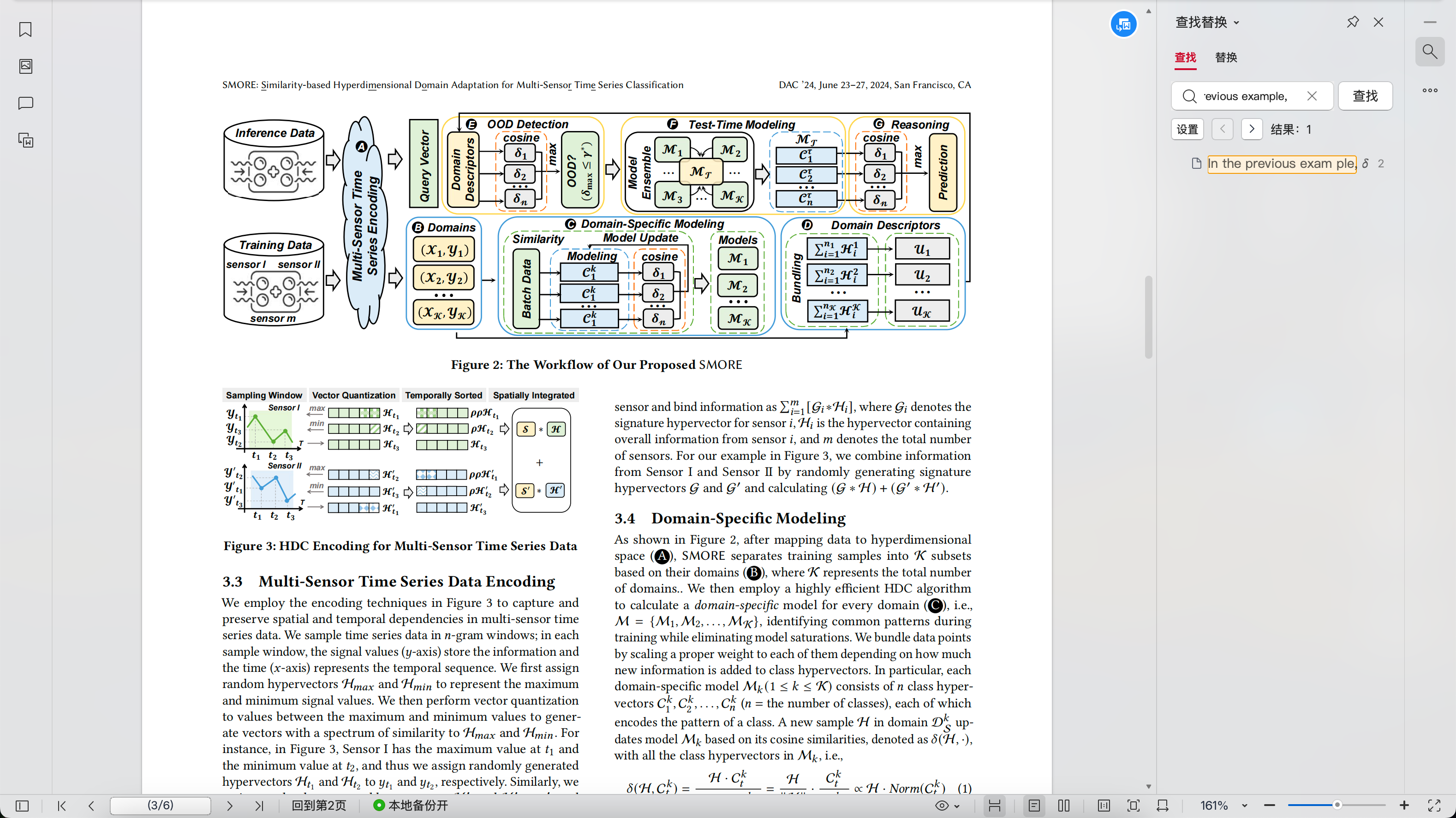
These screenshots show actual parsing results in a FastGPT Dataset with OXR enabled. Switch between OXR result and Original PDF for each example. Click an image to zoom in.
Text and formulas
Compare section headings, body text, and inline formulas from a paper with two columns with the parsed content displayed in FastGPT.
Figures and captions
Compare the paper's diagrams and captions with the extracted images displayed alongside the text in FastGPT.
Tables
Compare an experimental results table in the original PDF with its headers, rows, and values displayed in FastGPT.